# Abstract

The Elumicate Smart Vision network

![](https://2084496703-files.gitbook.io/~/files/v0/b/gitbook-x-prod.appspot.com/o/spaces%2FkKQ6WJAAsequC8RCJVqS%2Fuploads%2FLOV1OkEq2Q8rJl0yVxEg%2Fpexels-pixabay-163064.jpg?alt=media\&token=c37e5712-2619-4544-bde4-7ce2cc781238)

Elumicate is a company driven by the core values of transparency, accessibility, and community empowerment. We believe that information should be readily available to all, empowering individuals to participate in decision-making processes that shape our society. Through our commitment to building transparent, secure, and flexible systems, we harness the latest tools and technologies to create a better future for everyone.

Our vision revolves around ensuring that those most affected by important decisions have a voice. We advocate for inclusivity, enabling individuals from all walks of life to actively participate in shaping their communities. We reject the notion of unchecked control in the hands of a select few and strive to provide a platform where everyone's opinion is valued.

Safety, security, and environmental sustainability are paramount in our mission. The rapid growth of cities and populations brings forth significant challenges that require innovative solutions. Elumicate recognizes the need for a vision network that addresses critical issues such as safety and security, traffic congestion, pollution levels, and first response alerting. This network should be designed collaboratively, with active community participation, and cater to the needs of all, rather than a privileged few. We believe in a network built by the people, for the people.

### The Elumicate Smart Vision Network

Introducing the Elumicate Smart Vision Network, a revolutionary platform that captures and delivers real-time data to educate and inform third parties about real-world activities and events, both in historical and real-time contexts. Unlike traditional networks, the Elumicate Smart Vision Network is collectively owned and governed by its participants, without central control. Through advanced technologies, our network captures real-world events and transforms them into easily accessible digital data.

To incentivize and reward participants for their contributions, the Elumicate Smart Vision Network operates on a token model. Participants can utilize these tokens to obtain data credits and gain access to the network's valuable digital data. With a strong emphasis on security and anonymity, our governance model ensures that relevant decisions are democratically voted upon by network participants.

We embrace the power of blockchain technology to provide full transparency at all times. The Elumicate Smart Vision Network's tracking activity is made public, fostering trust and accountability within our community. By actively involving the community in the network's development, we strive to create a platform that serves the needs of all, promoting innovation and improving quality of life. Imagine cleaner air, reduced traffic congestion, enhanced security, and countless other benefits that our network can bring.

Join us on this transformative journey as we build a more transparent, secure, and flexible world together. Together, we can shape a future where information is accessible, decisions are inclusive, and the power of technology fuels positive change. Experience the potential of the Elumicate Smart Vision Network and be part of the movement towards a brighter future.


# Introduction

Why build a Smart Vision Network?

Unleashing the Power of Real-World Data

In today's Information Age, technological advancements have made human activity and behavior data more accessible than ever before. However, the ownership and control of this valuable data by governments and large corporations create inefficiencies and hinder widespread access. The few dictate when and if the many can access data generated by their own actions, limiting its potential.

Unfortunately, real-world behavioral data remains largely untapped despite its high demand. Industries worth trillions of dollars rely on approximate data obtained through methods like cell tower triangulation and cell phone tracking, which are facing privacy concerns and limitations. The costs and complexities of capturing, digitizing, processing, and analyzing outdoor activity data in public areas have impeded progress in this field. Manual processes, such as traffic counting, are often employed as costly workarounds.

Even well-funded cities investing in "smart" initiatives have encountered challenges. Proprietary solutions that exclude external parties from offering solutions have proven ineffective, leading to more problems than solutions. Scaling existing infrastructure and managing resource-intensive processes is prohibitively expensive and unfeasible for cities with limited budgets. This issue extends beyond cities and affects various industries and markets.

The solution lies in the Elumicate Smart Vision Network, an innovative platform that captures and delivers real-world data securely, anonymously, and transparently. Unlike traditional networks, the Elumicate Smart Vision Network is owned and governed by all its participants, ensuring collective decision-making without centralized control. Leveraging advanced technologies, the network converts real-world events into easily accessible digital data.

To encourage and reward active participation, the Elumicate Smart Vision Network operates on a token model. Participants can use tokens to obtain data credits and access the network's valuable digital data. A governance model ensures fair decision-making, with relevant choices voted upon by network participants. By empowering individuals and fostering collaboration, the network becomes a catalyst for innovation and a driver of improved quality of life.

The potential benefits are vast. Imagine cleaner air, reduced traffic congestion, predictive security enhancements, and lives saved. By harnessing the power of real-world data, the Elumicate Smart Vision Network paves the way for groundbreaking advancements in various sectors. It offers a scalable, cost-effective, and manageable solution, unlocking opportunities for cities, industries, and markets alike.

Join us in embracing the future, where data is utilized to its full potential. Together, we can build a world with increased transparency, improved security, and enhanced quality of life. Experience the transformative power of the Elumicate Smart Vision Network and be part of the movement that drives progress and positive change.


# Solution Overview

The World's Largest Decentralized Outdoor Vision Data Capture Network

![](https://2084496703-files.gitbook.io/~/files/v0/b/gitbook-x-prod.appspot.com/o/spaces%2FkKQ6WJAAsequC8RCJVqS%2Fuploads%2F3ESbW1fTUh6pzVmX1E67%2Fearth.jpg?alt=media\&token=66407331-b374-424d-96cb-db8cb809ad21)

Welcome to Elumicate, the world's largest decentralized outdoor vision data capture network. Our mission is to digitize and share precise real-world event data in real-time while rewarding participants who contribute to the network. By utilizing blockchain technologies, scale, and network effects, we offer solutions to specific use cases that were previously impossible with proprietary and private setups.

#### **The Elumicate network focuses on accumulating and delivering relevant data across multiple industries and markets. The benefits of instant access to outdoor data are far-reaching:**

**Cities:** Gain better predictions for future infrastructure requirements, tackle traffic congestion, reduce pollution levels, optimize budget costs, enhance public safety, and more.

**Retail, developers, road engineers, landlords, realtors, restaurants, marketers, advertisers:** Benefit from traffic segmentation, precise counts, and predictive analysis for store placement, future developments, and a deeper understanding of target markets.

**Road conditions:** Receive real-time reports on line monitoring, near misses, speed, debris, potholes, and other critical information.

**First Responders:** Enable immediate dispatch with a solid understanding of events such as collisions, health emergencies, crime, or natural occurrences.

**Wildlife:** Improve understanding of their environments and promote their survival.

**Water sources:** Track critical water levels and monitor potential flooding.

The advantages of leveraging Elumicate's network are vast, leading to cleaner air, shortened commute times, increased safety, life-saving alerts, and an overall higher quality of life.

#### **API Access:**&#x20;

Our network offers direct integration to external programs and applications through API access. Third-party developers are incentivized to create innovative solutions by leveraging the data offerings of the network.

#### **Data Retrieval:**

Elumicate is committed to adhering to GDPR and local laws regarding data privacy. We prioritize anonymity and will only implement data digitization when there is demand for it. Any requests for tracking that may compromise anonymity will be subject to a community vote, ensuring compliance with local regulations and laws.

#### **Decentralized Ownership:**&#x20;

At Elumicate, we believe in empowering participants by giving them control over the network and decision-making. Participants have voting rights on matters that impact their lives, ensuring that power is not concentrated in the hands of controlling groups or large corporations.

#### In addition, when you add your cameras to the Elumicate network, you unlock extra functionalities and benefits.&#x20;

By contributing your camera feeds, you become an active participant in the network, capturing valuable real-world data. These extra functionalities include personal event recording, monitoring and security alerts for your registered areas, enhanced insights from advanced analytics, and the opportunity to collaborate with a community of like-minded individuals.

#### Join us in revolutionizing the way outdoor vision data is captured and shared.&#x20;

Together, we can create a transparent, secure, and equitable network that fuels innovation and drives positive change. Experience the power of Elumicate and be part of a decentralized movement that empowers individuals and communities worldwide.


# Relevant Markets

Digitized ground truth data is relevant to a wide range of markets, industries, and use cases.

### **Cities / Government Organizations**

<img src="https://2084496703-files.gitbook.io/~/files/v0/b/gitbook-x-prod.appspot.com/o/spaces%2FkKQ6WJAAsequC8RCJVqS%2Fuploads%2FeEThNIV5XihsZRZEvEup%2Fcity%20traffic.jpg?alt=media&amp;token=06246bbb-79c8-4b3e-9217-e8d3953ac78b" alt="" data-size="original">

Cities and government organizations require up-to-date and relevant data to aid in planning, mitigation, and problem-solving for issues such as traffic congestion, roadworks, safety, and more. With the growing urbanization, there is a pressing need for innovation in multiple areas such as infrastructure management, emissions control, sustainability, and growth. However, many of the current methods being used for retrieving relevant data are expensive, time-consuming, and provide stale or inaccurate data, draining valuable resources. Our global vision network provides accurate, real-time data to address these challenges. \
\
A report by ResearchAndMarkets states that the global smart cities market is expected to reach a value of US $6.97 trillion by 2030.

### **Out of Home Advertising**

![](https://2084496703-files.gitbook.io/~/files/v0/b/gitbook-x-prod.appspot.com/o/spaces%2FkKQ6WJAAsequC8RCJVqS%2Fuploads%2F9E8m9GDpHkPz1X2UL55W%2Fbillboard.jpg?alt=media\&token=026e94a2-0907-4f87-99f0-cb28f634e166)

Real-world advertising is a great alternative or complement to online advertising, but the industry has suffered from a lack of information about their audience. By providing instant access to traffic metrics and demographics, we can offer detailed and quantifiable insights into awareness and conversions. Our network provides exact data in real-time, allowing for enhanced analytics and insights for the outdoor advertising industry. \
\
The global outdoor advertising market is forecast to reach a value of US $52.3 billion by 2027, according to a report by Imarc Group.

### **Retail**

![](https://2084496703-files.gitbook.io/~/files/v0/b/gitbook-x-prod.appspot.com/o/spaces%2FkKQ6WJAAsequC8RCJVqS%2Fuploads%2FpenY36XEIbowX9K494lY%2Fstore.jpg?alt=media\&token=ac8f5908-f032-4d2c-b31a-d57e2fa53af2)

With the rise of online shopping, physical store and shop location for retailers is more important than ever. Retailers must understand the metrics surrounding their presence to offer their target audience the best shopping experience. Store placement is critical, and it can mean the difference between success and failure. \
\
Our enhanced analytics and insights provide valuable data to this expanding market, which is expected to reach a value of US $29.4 trillion in 2025, according to a report by ResearchAndMarkets.

### **Restaurants**

![](https://2084496703-files.gitbook.io/~/files/v0/b/gitbook-x-prod.appspot.com/o/spaces%2FkKQ6WJAAsequC8RCJVqS%2Fuploads%2FvVYVuUy8tFeEBFhlObjE%2Frestraurant.jpg?alt=media\&token=cd340c4c-3b47-4d33-b31d-e7ee97966d57)

Restaurants operate in a highly competitive market, and even the slightest advantage can make the difference between success and failure. With the rapidly changing landscape due to delivery services such as Uber Eats, DoorDash, and Skip The Dishes, it is increasingly important for restaurant owners to have a deeper understanding of location demographics and analytics surrounding traffic patterns and projections. \
\
Our data analytics provide real-time and historical data that can help restaurants gain a competitive edge in this market.

### **Landlords, Realtors, Developers**

![](https://2084496703-files.gitbook.io/~/files/v0/b/gitbook-x-prod.appspot.com/o/spaces%2FkKQ6WJAAsequC8RCJVqS%2Fuploads%2FuxEDi5WNeEAkiJnUi8LB%2Fmall.jpg?alt=media\&token=3a17f7f2-a939-4cd0-b768-0882bdb3e0bd)

Location is crucial in real estate, and our global vision network provides real-time and historical data pertaining to traffic, allowing a better understanding of existing location values, target markets, and predictive insight into future expansion and development projects. \
\
Our data analytics help landlords, realtors, and developers make informed decisions that can lead to success.

### **Small Businesses**

![](https://2084496703-files.gitbook.io/~/files/v0/b/gitbook-x-prod.appspot.com/o/spaces%2FkKQ6WJAAsequC8RCJVqS%2Fuploads%2FTeHp1QtV9A3H8N0SYooS%2Fbus.jpg?alt=media\&token=a4be9595-c6d8-4b23-9011-e80e4fc8c76f)

Small businesses already face challenges due to retail giants and online competition. By offering a deep understanding of surrounding demographics, full analytics, and deep insights, we can help small businesses gain a significant edge and increase their chances of success and profitability.

### Nature and Ecology

Ecologists require steady data to study the relationships between living things and their habitats. Our global vision network serves to deliver critical data for nature, ecology, and conservation, ranging from moss living on trees to weather patterns and much more. By providing steady, reliable data, we can help ecologists make informed decisions that can lead to better conservation efforts.

&#x20;![](https://2084496703-files.gitbook.io/~/files/v0/b/gitbook-x-prod.appspot.com/o/spaces%2FkKQ6WJAAsequC8RCJVqS%2Fuploads%2FpH7iB1qoHtiT2y84ZuSh%2Fpexels-pixabay-45911.jpg?alt=media\&token=df609d2f-f0d1-41b1-958d-d735e4f0dcbf)


# Events Tracked

![Tracking Traffic](https://2084496703-files.gitbook.io/~/files/v0/b/gitbook-x-prod.appspot.com/o/spaces%2FkKQ6WJAAsequC8RCJVqS%2Fuploads%2FQoZe4jft0oPTB8b7X1oq%2Ftraffic%20lights.jpg?alt=media\&token=a27916ad-43f1-436a-a390-55c117dec8ed)

The Elumicate network offers extensive tracking capabilities to capture and analyze various events and factors in real-time. These tracking possibilities include:

1. License plate identification: The network can capture and analyze license plates to track vehicle movement and identify specific vehicles.
2. Vehicle attributes: Elumicate can gather data on vehicle attributes such as make, model, size, weight, and color, providing valuable insights for traffic analysis and planning.
3. Speed monitoring: The network can track the speed of vehicles, enabling real-time monitoring and analysis of traffic flow and congestion.
4. Occupancy detection: By using advanced vision technologies, Elumicate can estimate the number of occupants in vehicles, providing valuable data for transportation planning and analysis.
5. Facial recognition: The network has the capability to perform facial recognition, enabling identification and tracking of individuals in public spaces.
6. Threat detection: Elumicate can identify and track potential threats or suspicious activities, contributing to enhanced public safety and security measures.
7. Foreign object detection: The network can detect and track foreign objects or debris on roads, helping to improve road safety and maintenance.
8. Traffic violations: Elumicate can identify and track traffic violations, such as running red lights or illegal parking, aiding in enforcement and promoting safer roads.
9. Road and building degradation: The network can monitor and track the deterioration of roads and buildings, assisting in maintenance and infrastructure planning.
10. Pothole detection: Elumicate can identify and track potholes on roads, facilitating timely repairs and improving driving conditions.
11. Snow removal: By tracking snow accumulation and clearance efforts, Elumicate can contribute to efficient snow removal operations, ensuring safer road conditions.
12. Obstruction monitoring: The network can detect and track obstructions on roads or sidewalks, allowing for timely interventions to ensure unobstructed pathways.
13. Accident detection: Elumicate can identify and track accidents or collisions, enabling faster response times for emergency services and improved incident management.
14. Flood monitoring: The network can track water levels and flooding in real-time, providing crucial information for flood prevention and mitigation measures.
15. Fire detection: Elumicate can identify and track the occurrence of fires, aiding in early detection and rapid response to minimize damage and ensure public safety.
16. Health emergencies: By tracking events such as falls, accidents, or medical emergencies, Elumicate can assist in providing timely assistance and emergency response.
17. Wildlife monitoring: The network can track wildlife movement and behavior, contributing to conservation efforts and wildlife management.
18. Crowd monitoring: Elumicate can monitor crowd density and movement in public spaces, facilitating crowd management and event planning.

It's important to emphasize that all tracking activities carried out by the Elumicate network will adhere to local laws, privacy regulations, and community guidelines. Privacy and data protection will be paramount, ensuring that the network operates in a transparent and responsible manner.

![Accident Detection and Alerting](https://2084496703-files.gitbook.io/~/files/v0/b/gitbook-x-prod.appspot.com/o/spaces%2FkKQ6WJAAsequC8RCJVqS%2Fuploads%2F4BnYLqTx14nzqlt8Fpyj%2Femerg.jpg?alt=media\&token=0a8e2979-5177-4da0-8382-acf24d92c683)


# Technical Features

The Elumicate Network leverages a range of advanced technologies to effectively accumulate, deliver, and provide access to relevant data. Here are the core technologies utilized within the network:

1. IoTeX: IoTeX is a triple audited and award-winning blockchain platform designed specifically for IoT devices. It offers high speed, security, and scalability, making it an ideal infrastructure for storing Elumicate data securely. The IoTeX blockchain is utilized for token transactions, smart contracts, and data verification purposes.
2. Smart Contracts: Smart contracts are digital contracts stored on the blockchain that automatically execute predefined terms and conditions. In the Elumicate Network, smart contracts are used for token transactions, including access, distribution, conversions, transfers, and other related operations.
3. Artificial Intelligence and Machine Learning: AI and ML technologies play a crucial role in gathering, validating, and extrapolating event data within the Elumicate Network. These technologies enable the network to provide accurate and meaningful insights, as well as learning and verification models for various use cases.
4. Network dApp: Participants join the Elumicate Network through a dedicated decentralized application (dApp). The dApp serves as a platform for participants to verify their status, perform token transactions, and engage with other network functionalities.
5. NFTs (Non-Fungible Tokens): NFTs are utilized within the Elumicate Network to offer participation benefits and incentives to network participants. These tokens represent unique digital assets and provide additional value and rewards to users.
6. API (Application Programming Interface): The Elumicate Network incorporates a system API that enables external access to the stored data. Data purchasers, ecosystem providers, resellers, and relevant third-party entities can leverage this API to access and utilize the accumulated data for their specific purposes.
7. Vision Capture Devices: Vision capture devices are essential components of the network, strategically placed by participants to gather relevant real-world event data. These devices, which can include cameras or other sensors, capture visual and contextual information to contribute to the network's data accumulation.
8. Digitization Hardware: Data mining and digitization processes are achieved through a combination of edge computing, cloud computing, and hardware mining. The specific hardware requirements will vary based on the development phase and data capture needs. As the network evolves, there may be a need for upgraded hardware to support new digitization requests. Device owners within the network may be requested to upgrade their hardware to meet the evolving demands of the network.

By leveraging these advanced technologies, the Elumicate Network ensures the secure and efficient accumulation, delivery, and access of relevant real-world event data, driving innovation and providing valuable insights for various industries and markets.


# Roadmap

The Road to Prosperity
<figure><img src="https://2084496703-files.gitbook.io/~/files/v0/b/gitbook-x-prod.appspot.com/o/spaces%2FkKQ6WJAAsequC8RCJVqS%2Fuploads%2F2CyVIysmnRmMW65mQPuT%2FElumicate%20Roadmap%20(6).png?alt=media&amp;token=177c73d4-4bd1-4209-9a41-f928a2f3ad31" alt=""><figcaption></figcaption></figure>


# IoTeX Overview

IoTeX

The IoTeX platform was built from scratch to support large-scale, decentralized IoT use cases. IoTeX is more than just a blockchain -- it is a full-stack platform to enable trusted data from trusted devices for use in trusted DApps. The IoTeX platform was architected by an award-winning team of cryptographers and research scientists that currently lead the world's premier technology and standards consortiums, including the IIC, IEEE, and CCC.

![](https://2084496703-files.gitbook.io/~/files/v0/b/gitbook-x-prod.appspot.com/o/spaces%2FkKQ6WJAAsequC8RCJVqS%2Fuploads%2FVkNItZ4gpMhCm1tVRITt%2Fiotex%20trusted%20data.png?alt=media\&token=3eef3d0c-208a-4ff2-8bdc-6491680bb07c)

Although architecturally similar to Ethereum, IoTeX is not an "Ethereum killer". Rather, IoTeX will be the hub for decentralized IoT data/devices and collaborate with Ethereum and other Layer 1 platforms. The IoTeX platform employs a modular architecture consisting of various technological layers:&#x20;

* Blockchain: EVM-compatible, Roll-DPoS consensus (5 sec blocks + instant finality), maintained by 60+ decentralized Delegates&#x20;
* Decentralized Identity (DID): on-chain identity framework that enables users/devices to own their data, identity, and credentials&#x20;
* Real World Data Oracles: convert real world phenomena into verifiable, blockchain-ready data for use in IoTeX DApps&#x20;
* Secure Hardware: tamper-proof devices utilizing Trusted Execution Environment (TEE) that integrate seamlessly with IoTeX

**IoTeX Blockchain**&#x20;

The IoTeX blockchain is decentralized, EVM-compatible, and lightning-fast, making it the perfect foundation for decentralized applications and products. Powered by our in-house Roll-DPoS consensus mechanism, the IoTeX blockchain is governed and maintained by 60+ Delegates for true decentralization. As the "root of trust" for the entire IoTeX Network, our blockchain is fully open-source and built-from-scratch to the highest technical standards. It is also one of the fastest blockchains in the industry (5-second blocks w/ instant finality) and has been running error-free since 2019.

![](https://2084496703-files.gitbook.io/~/files/v0/b/gitbook-x-prod.appspot.com/o/spaces%2FkKQ6WJAAsequC8RCJVqS%2Fuploads%2FDhZe1fcYpt6F98NcOFoQ%2Fiotex%20blockchain.png?alt=media\&token=4dac50b4-38c3-40db-84b3-6b53f5dc6113)

The IoTeX blockchain is compatible with the Ethereum Virtual Machine (EVM), which allows developers to build/convert any Solidity-based smart contract on IoTeX. In June 2020, IoTeX launched Mainnet GA "Machina", our fully native blockchain that incorporates native staking (nsv2) and powered by the native IOTX token. In January 2021, the IoTeX blockchain surpassed 10 million transactions and now processes thousands of transactions every day.

The IoTeX blockchain utilizes Roll-DPoS consensus, a variant of Delegated Proof of Stake (DPoS) designed in-house to support the high scalability required for IoT use cases. Unlike traditional DPoS that utilizes a fixed number of Delegates (e.g., EOS has 21 block producers), Roll-DPoS randomly selects 24 of the top 36 community-voted Delegates to mine every hour, which greatly improves the decentralization and security of the IoTeX Network without sacrificing performance.

**IoTeX Decentralized Identity**&#x20;

Decentralized Identity (DID) is a core component of the IoTeX platform, serving as the "root of self-sovereignty" for the entire network. Unlike other blockchain platforms that focus on DID for only people, IoTeX has developed a unique DID system for both people and devices. This means people and devices can transact directly with each other via IoTeX, as their identities are interoperable and standardized across the platform. Furthermore, IoTeX DID empowers users and devices to own/control their data and identity, and utilize them across the IoTeX network.

IoTeX's DID technology and accompanying Identity & Access Management (IAM) framework are now being standardized in enterprise technology consortiums, including the Industrial Internet Consortium (IIC). For global-scale IoT ecosystems that include diverse manufacturers, billions of IoT devices, and millions of users, IoTeX's DID + IAM framework can connect heterogeneous application silos and facilitate user-centric data sharing in a decentralized manner.

![](https://2084496703-files.gitbook.io/~/files/v0/b/gitbook-x-prod.appspot.com/o/spaces%2FkKQ6WJAAsequC8RCJVqS%2Fuploads%2F2Fete8lVC0trqi8EZ6kg%2Fiotex%20decentralized%20identity.png?alt=media\&token=7ffcf7a1-55a7-40ed-88a5-f6d910eee683)

IoTeX Real World Data Oracles

For blockchains to reach their full potential, they need access to the world’s data. This is why oracles are crucial to make off-chain data available to on-chain smart contracts. Unlike conventional oracles that focus on data from centralized databases (e.g., crypto prices), IoTeX is building the world's first “real world data oracles” to unlock an entirely new data source for the blockchain industry: verifiable real world data from trusted devices. Our unique oracles are the first-of-its-kind and position IoTeX to be the de facto hub for real world data for the entire blockchain universe.

![](https://2084496703-files.gitbook.io/~/files/v0/b/gitbook-x-prod.appspot.com/o/spaces%2FkKQ6WJAAsequC8RCJVqS%2Fuploads%2FXEuhuq5RUreBQiaMH6nN%2Fiotex%20data%20oracles.png?alt=media\&token=2b54efe0-d9be-47a1-9e11-f706316f7a27)

On-chain real world data will empower DeFIoT use cases and pave the way for new on-chain assets backed by real world data on IoTeX. Becoming an official hub for real world data also positions IoTeX to “serve” data to other blockchains like Ethereum and Polkadot in the future.

<figure><img src="https://2084496703-files.gitbook.io/~/files/v0/b/gitbook-x-prod.appspot.com/o/spaces%2FkKQ6WJAAsequC8RCJVqS%2Fuploads%2Fm38uhwt2iG1SZ6tjwvKo%2Fiotex%20chain%20transfert.png?alt=media&amp;token=8eb4e731-d9af-40d2-b65f-c88d06b734a9" alt=""><figcaption></figcaption></figure>

**IoTeX Secure Hardware Layer (TEE)**&#x20;

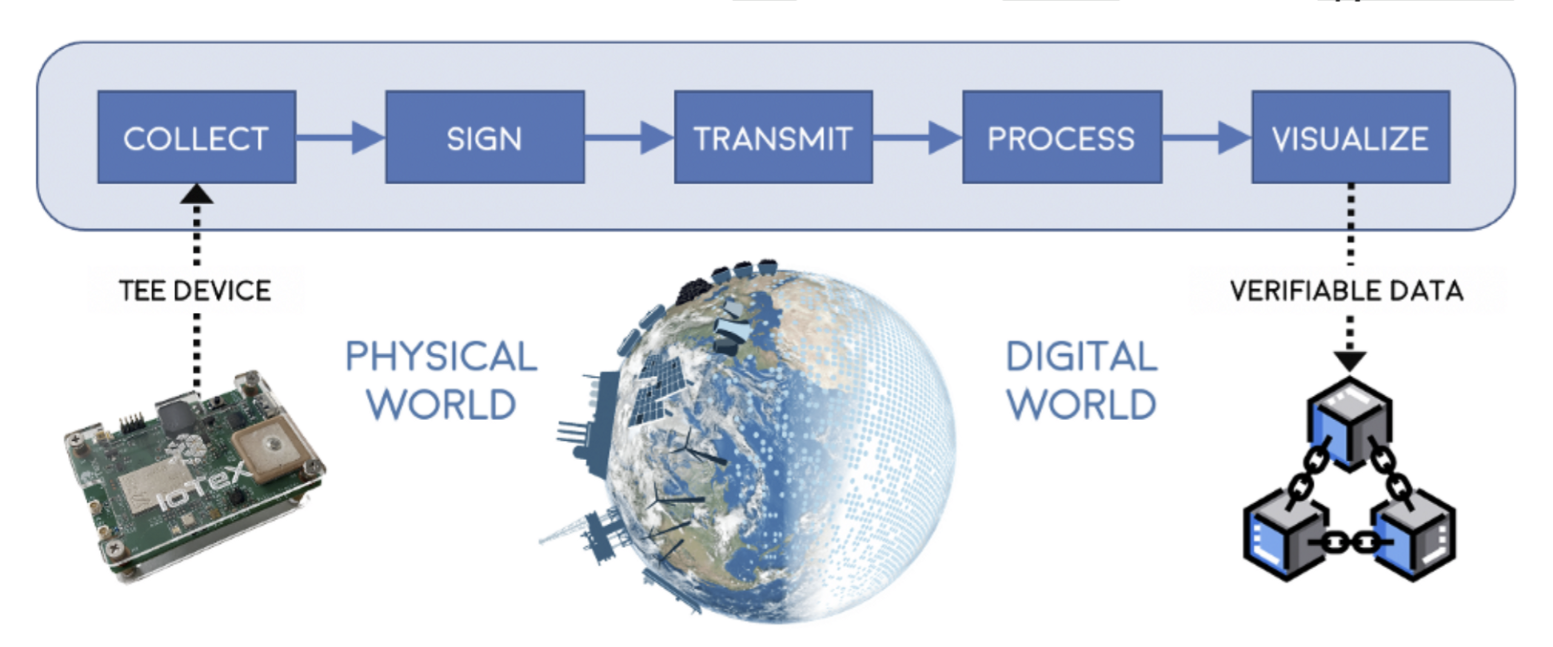
IoTeX combines tamper-proof hardware and tamper-proof software (blockchain) to enable end-to-end trusted solutions. Secure hardware is tamper-proof as it incorporates trusted execution environments (TEEs), which are un-hackable and isolated enclaves that runs in parallel with the main system of a device/machine. A TEE ensures the confidentiality and integrity of all data and processes run within the TEE -- this method of computing is often termed confidential computing.&#x20;

*“If the main system is the White House, a TEE is the bunker underneath it.”*&#x20;

Devices today use TEE for highly sensitive processes; for example, mobile devices for FaceID/fingerprints and Ledger wallets for private key storage. When combined with blockchain, TEEs present a way for smart devices to hold their own DID + private key, verifiably sign/submit transactions, and interact peer-to-peer with other users and devices on the blockchain. IoTeX is pioneering this concept of blockchain + TEE in multiple form factors, including edge devices (e.g., Arm TrustZone) and confidential computing servers (e.g., Intel SGX), with the goal of empowering the first decentralized machines that can participate autonomously in the Internet of Trusted Things.


# Elumicate & IoTex

{% content-ref url="/pages/8bdElzhypyKq2SoPnKk2" %}
[Overview](/blockchain/elumicate-and-iotex/overview)
{% endcontent-ref %}

{% content-ref url="/pages/wQMKlfKszhdJRI9mLunz" %}
[Architectural Diagrams](/blockchain/elumicate-and-iotex/architectural-diagrams)
{% endcontent-ref %}


# Overview

Elumicate’s decentralization needs makes IoTeX, with their strong focus on the IoT and data space, the right choice that will allow for rapid design and implementation.

Indeed, by leveraging IoTeX's expertise and technology stack, Elumicate is able to realize its vision of a decentralized network for capturing and delivering trusted real-world event data. IoTeX's strong focus on the IoT and data space makes it a suitable choice for Elumicate's needs.

The Elumicate Network utilizes IoTeX's decentralized storage and smart contract tools, which are key components for ensuring the secure and reliable delivery of trusted data. These tools enable trusted devices to contribute verified real-world event data to the network. Through the use of IoTeX's tech stack, Elumicate can establish a robust system that harnesses the power of real-world data oracles to provide verifiable and trustworthy data from these trusted devices.

By collaborating with IoTeX and leveraging their technology, Elumicate is able to build a network that ensures the integrity and authenticity of the data captured, contributing to the network's overall transparency and reliability. This partnership allows Elumicate to fulfill its mission of providing accurate and valuable real-world event data to various industries and markets, driving innovation and enabling informed decision-making.

<figure><img src="https://2084496703-files.gitbook.io/~/files/v0/b/gitbook-x-prod.appspot.com/o/spaces%2FkKQ6WJAAsequC8RCJVqS%2Fuploads%2Fw9ng6a7UKsEAKGGyqrSe%2FRocket.png?alt=media&amp;token=3cb99e8c-b0ba-432d-a1f9-65621eda508d" alt=""><figcaption></figcaption></figure>


# Architectural Diagrams

**Blockchain Level, aka as the ledger - L1 Design**

![](https://2084496703-files.gitbook.io/~/files/v0/b/gitbook-x-prod.appspot.com/o/spaces%2FkKQ6WJAAsequC8RCJVqS%2Fuploads%2FfOc0mVIOuetpJvMl5Kcp%2FDiagram%20L1%20IOTEX_%20ELUMICATE.jpg?alt=media\&token=cee199a6-c043-4156-9e0d-f9e4ecc54ee5)

**Oracle Level - L2 Design**

![](https://2084496703-files.gitbook.io/~/files/v0/b/gitbook-x-prod.appspot.com/o/spaces%2FkKQ6WJAAsequC8RCJVqS%2Fuploads%2FRipUSO0MqQIghL0ytv7V%2FDiagram%20L2%20IOTEX%20_%20ELUMICATE.jpg?alt=media\&token=d4c2f213-3f98-4e4c-b2b6-77ff2c52e8cf)


# The ELUM Token

### ![](https://2084496703-files.gitbook.io/~/files/v0/b/gitbook-x-prod.appspot.com/o/spaces%2FkKQ6WJAAsequC8RCJVqS%2Fuploads%2FGjIsHXKzYLYfs7PuyaeF%2Fimage.png?alt=media\&token=4e94c80f-37a1-4bee-9a40-75caa022ed79)

### What is the ELUM Token?

The ELUM token is a cryptocurrency that plays a crucial role within the Elumicate Network. It serves as a tradable utility, providing rewards and access to data for network participants. Here are key points about the ELUM token:

1. Acquisition and Transfer of Data: Holders of the ELUM token can personally acquire data or transfer it to third parties who are seeking access to the data. This facilitates the flow of data within the Elumicate ecosystem.
2. Exchange for Data Credits: ELUM tokens can be exchanged for data credits, which grant access to the accumulated data within the network. These data credits are non-transferable and can only be used within the Elumicate ecosystem.
3. Return to Mining Pool: When ELUM tokens are exchanged for data credits, they are returned to the mining pool. This ensures the continuous availability and distribution of tokens to network participants.
4. Value in USD: The value of the ELUM token, when redeemed for data credits, is directly proportional to its value in USD. For example, if one ELUM token has a market value of $100 at the time of redemption, the redeemer will receive $100 USD worth of data credits.
5. Limited Supply and Release Schedule: The ELUM token has a limited supply, which means its total quantity will never increase. The release schedule of the token includes halving periods based on the number of active network workers. As the network expands, the token rewards earned per worker decrease.
6. Backed by Data: The ELUM token's value is directly tied to the value of the data within the Elumicate Network. As the demand and importance of the data grow, the value of the token is expected to increase.

Overall, the ELUM token incentivizes participation, rewards data acquisition, and facilitates access to valuable data within the Elumicate Network. It provides a means of exchange and represents the value of the data accumulated within the ecosystem.


# Initial Supply and Distribution

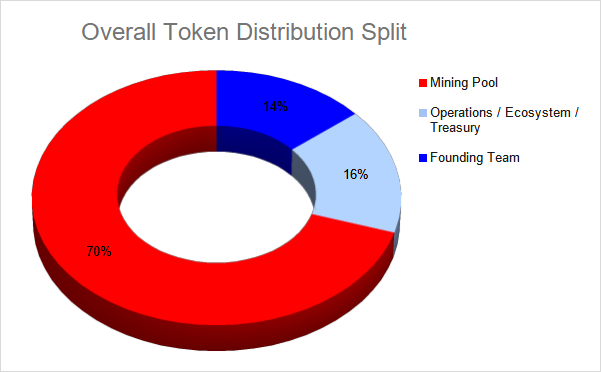
<figure><img src="https://2084496703-files.gitbook.io/~/files/v0/b/gitbook-x-prod.appspot.com/o/spaces%2FkKQ6WJAAsequC8RCJVqS%2Fuploads%2FB40XPxpAojYsDF3NdiPX%2Fimage.png?alt=media&amp;token=cb900f40-21ce-4f4f-a6d5-70f3a51b4c30" alt=""><figcaption></figcaption></figure>

The ELUM token will be issued on the IoTeX Root Chain with a maximum supply of 20,000,000,000 tokens minted at launch. However, the majority of these tokens will be locked and released gradually over time, ensuring controlled distribution and scarcity.

Mining rewards within the Elumicate Network are distributed based on a weight rating system. This rating is determined by various factors, including the capture device (camera) used, ownership of NFTs, staking activities, and participation in data mining and processing.

In addition to mining rewards, tokens are also allocated to the internal team, operations, ecosystem development, and treasury. However, these tokens are subject to a vesting schedule of 48 months. The vesting period means that the tokens will be gradually released over a 4-year period, starting from the 1st day of the 6th month after the launch date. Each month, 1/48th of the locked amount will be distributed.

This structure ensures a controlled release of tokens and provides long-term stability and commitment to the growth and development of the Elumicate Network. It also aligns the interests of the token holders and the project's success over an extended period.


# Mining Rewards

Network participants will earn rewards for participation at varying levels.

{% content-ref url="/pages/qFb0jxyegSGfLBCR6PUS" %}
[Mining Reward Distributions](/tokenomics/mining-rewards/mining-reward-distributions)
{% endcontent-ref %}

{% content-ref url="/pages/uhmx0RWKG0vdji9RbFox" %}
[Worker Rewards](/tokenomics/mining-rewards/worker-rewards)
{% endcontent-ref %}

{% content-ref url="/pages/G5GgGXKePLGjJ6hBrj2x" %}
[Broken mention](broken://pages/G5GgGXKePLGjJ6hBrj2x)
{% endcontent-ref %}

{% content-ref url="/pages/NMCtHlOiZyjMRD6oJLBM" %}
[Broken mention](broken://pages/NMCtHlOiZyjMRD6oJLBM)
{% endcontent-ref %}


# Mining Reward Distributions

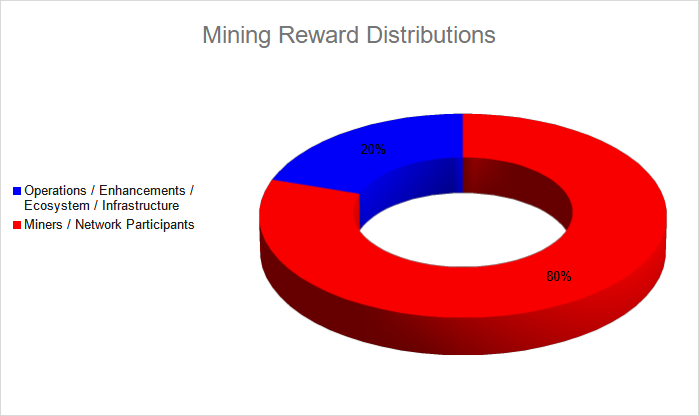
Mining pool rewards are distributed following a network participation halving schedule.

The total amount of tokens distributed for each 1hr epoch is dependent on the network's total number of workers. As the total number of workers increases, the rewards earned for each worker decreases.&#x20;

#### Tokens distributed by mining are distributed as follows:

Operations/Enhancements/Ecosystem/Infrastructure - 20%

Network participants / Miners - 80%

<figure><img src="https://2084496703-files.gitbook.io/~/files/v0/b/gitbook-x-prod.appspot.com/o/spaces%2FkKQ6WJAAsequC8RCJVqS%2Fuploads%2FxCnpVfLFsrliNicrcLW4%2Fimage.png?alt=media&amp;token=7805f908-5ce6-4a39-baa8-f2ee203a7da9" alt=""><figcaption></figcaption></figure>

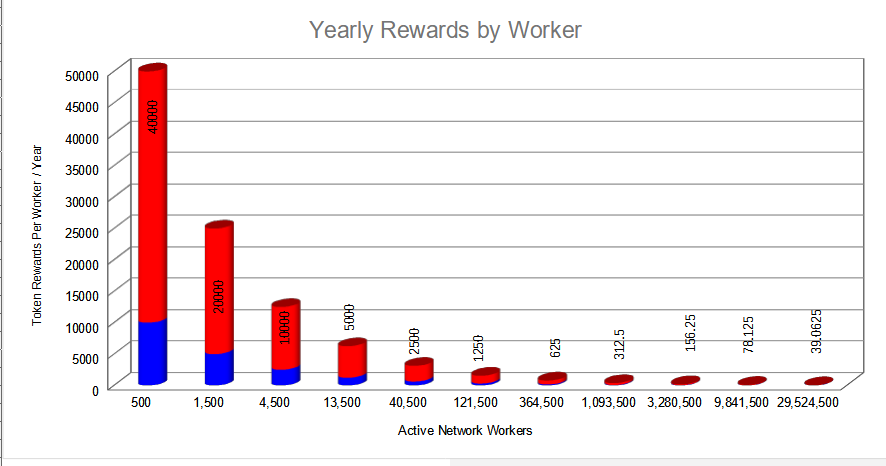
The Mining Rewards rate begins at 50,000 ELUM yearly tokens per worker and halves every time the total combined network workers triples in size.

Total Network Workers                                 Total Reward/Wrk/yr    User Reward/Wkr/yr    \
0 - 500                                                           50,000                           40,000\
501 - 1,500                                                     25,000                           20,000\
1,501 - 4,500                                                  12,500                           10,000 \
4,501 - 13,500                                                6,250                             5,000\
13,501 - 40,500                                              3,125                             2,500\
40,501 - 121,500                                            1562.5                           1,250\
121,501 - 364,500                                          781.25                            625\
364,501 - 1,093,500                                      390.63                           312.5\
1,093,501 - 3,280,500                                   195.31                            156.25                          \
3,280,501 - 9,841,500                                   97.66                              78.125\
9,841,501 - 29,524,500                                 48.83                             39.0625\
29,524,501 - 88,573,500                               24.41                             19.53125<br>

\*The total yearly mining reward distribution rate shall never exceed 25% of the total number of remaining tokens in the distribution pool. (For example, if there are 4 Billion remaining tokens in the mining pool, total distribution for each epoch will be calculated using 1 Billion tokens/yr as the maximum total distribution allowed (Total Hourly distribution = 1 Billion / 365 / 24))&#x20;

<figure><img src="https://2084496703-files.gitbook.io/~/files/v0/b/gitbook-x-prod.appspot.com/o/spaces%2FkKQ6WJAAsequC8RCJVqS%2Fuploads%2F44eFat4duK2ZkdBmgzlD%2Fimage.png?alt=media&amp;token=8671815b-6f02-422d-8fbd-b7a58ff93014" alt=""><figcaption></figcaption></figure>


# Worker Rewards

In the Elumicate Network, worker allocation plays a crucial role in ensuring the stability and efficiency of the network. The allocation of workers is based on specific tasks and the amount of work accomplished by each worker. The goal is to distribute rewards fairly among the workers based on their contributions.

During the network's inception, each input stream or camera feed is initially allocated one worker. However, as the network progresses and evolves, additional workers can be acquired through various means such as data mining, ownership of NFTs, and token staking.

The allocation of workers may change over time, driven by advancements in data mining efficiency and decreasing hardware costs. For example, as hardware miners become more powerful and cost-effective, they may be able to handle multiple camera streams simultaneously, leading to the allocation of multiple workers to a single miner.

Worker allocation can be determined by specific tasks or computational power. For instance, when a camera feed is on standby and ready to be mined, it may initially be allocated one worker. However, when the camera feed becomes actively mined for multiple tasks, such as firearm detection, wildlife tracking, traffic counting, speed detection, and parking space availability, it may receive additional workers proportional to the complexity and demand of the tasks being performed.

On the other hand, a different camera feed that is mined for a single task, such as vehicle count, may only be awarded one extra worker.

This dynamic allocation of workers ensures that the network optimizes its resources based on the workload and requirements of each camera feed, allowing for efficient data capture and processing while fairly rewarding the workers for their contributions.


# Token Recycling

In order to gain access to accumulated data, ELUM tokens must first be surrendered in exchange for data credits, which are pegged to the USD in value.&#x20;

ELUM tokens that are used to acquire data credits are transferred back into the mining pool and will be redistributed to workers as required according to the mining reward distribution rules.&#x20;


# Governance & Staking

A decentralised governance model ensures transparency and fair decision making for network related matters.&#x20;

Governance voting rights are obtained by Device & NFT ownership and by staking tokens.&#x20;

In order to ensure voters have a long term commitment and to counter potential risks found in one token - one vote systems, voting rights are allocated based on a staking model that gives an edge to those who are locked in for a longer duration.&#x20;

Voting power is calculated by multiplying the number of staked tokens by the relevant multiplier, which verifies the number of days remaining in the staking contract and not the number of days initially staked. Staking contracts may be renewed prior to voting to ensure maximum voting power.

**Voting power multipliers**

<table><thead><tr><th width="150">Staking Period</th><th>Multiplier</th></tr></thead><tbody><tr><td>45 days</td><td>1x</td></tr><tr><td>90 days</td><td>3x</td></tr><tr><td>180 days</td><td>8x</td></tr><tr><td>360 days</td><td>20x</td></tr></tbody></table>


# NFT Role

NFTs will be used to provide ecosystem benefits for the Elumicate network. Such benefits may include voting rights and increased worker levels for network devices.

![](https://2084496703-files.gitbook.io/~/files/v0/b/gitbook-x-prod.appspot.com/o/spaces%2FkKQ6WJAAsequC8RCJVqS%2Fuploads%2FTyV1RD6SElE2vOPtOQAq%2FMicrosoftTeams-image%20\(3\).png?alt=media\&token=5964f1e8-4c15-4eeb-afc4-55ee4ab87226)

### Data Miner NFT

The data miner NFT is required to create a secure link between the data mining device and mining portal

### Early Bird NFT

Early Bird NFTs are non transferrable and allow the holder to receive rewards for one extra worker as long as they have at least 1 active camera worker. If for example, a member has 3 cameras active, they will receive 1 extra worker if they hold an early bird NFT (they will receive rewards for 4 workers). If 3 cameras are installed, however none are active, they will not receive the bonus worker rewards.\
\
Early Bird NFTs can be claimed by proving device location within the Elumicate Mobile app.

### Landlord NFT

Stay tuned

### Ambassador NFT

Stay tuned


# What's a worker

\
To facilitate the efficient completion of various tasks on our network, we have implemented a rewards system that revolves around the concept of "workers." These workers are not traditional employees but virtual entities that represent the allocation of resources and rewards for specific job assignments.

<figure><img src="https://2084496703-files.gitbook.io/~/files/v0/b/gitbook-x-prod.appspot.com/o/spaces%2FkKQ6WJAAsequC8RCJVqS%2Fuploads%2FGu4odNh5A0lkgvKJhiTe%2Fimage.png?alt=media&amp;token=86797191-73a0-4bc1-9613-133f85a9938c" alt=""><figcaption><p>Worker in action</p></figcaption></figure>

The network requires a range of tasks to be completed in order to be successful including streaming video feeds, processing video data through AI detection, referring friends, acquiring NFTs, and much more. Each of these tasks is associated with a designated number of worker(s), who diligently perform their assigned responsibilities, thereby contributing to the overall functionality and effectiveness of the platform.

The allocation of workers ensures the fair distribution of network rewards, thereby optimizing the performance of our network. These workers are assigned based on the specific requirements of each task, taking into consideration factors such as expertise, availability, and task complexity.

By rewarding these virtual workers for their accomplished work, we create a strong incentive for active network participation, fostering a thriving ecosystem. The rewards offered are directly proportional to the successful completion of tasks, ensuring a fair and equitable distribution of benefits among our community members.


# Worker Rewards

In the Elumicate Network, worker allocation plays a crucial role in ensuring the stability and efficiency of the network. The allocation of workers is based on specific tasks and the amount of work accomplished by each worker. The goal is to distribute rewards fairly among the workers based on their contributions.

During the network's inception, each input stream or camera feed is initially allocated one worker. However, as the network progresses and evolves, additional workers can be acquired through various means such as data mining, ownership of NFTs, and token staking.

The allocation of workers may change over time, driven by advancements in data mining efficiency and decreasing hardware costs. For example, as hardware miners become more powerful and cost-effective, they may be able to handle multiple camera streams simultaneously, leading to the allocation of multiple workers to a single miner.

Worker allocation can be determined by specific tasks or computational power. For instance, when a camera feed is on standby and ready to be mined, it may initially be allocated one worker. However, when the camera feed becomes actively mined for multiple tasks, such as firearm detection, wildlife tracking, traffic counting, speed detection, and parking space availability, it may receive additional workers proportional to the complexity and demand of the tasks being performed.

It is important to note that workers are rewarded based on their active and online participation. Workers only receive rewards when they are actively and consistently online, diligently carrying out their designated tasks. This ensures that rewards are distributed to workers who are actively contributing to the network's operations and discourages inactive or offline participation.

This dynamic allocation of workers and the reward system based on active and online participation promotes the stability and efficiency of the Elumicate Network. It optimizes data capture and processing while fairly rewarding the workers for their contributions, encouraging them to remain active and consistently engaged within the network.

By incorporating these principles of worker allocation and rewarding active participation, the Elumicate Network maximizes the utilization of its resources, enhances data accuracy, and fosters a dynamic and engaged community of participants who actively contribute to the network's success.


# Refer a Friend

### The Elumicate Referral System

The referral system is designed to reward individuals for helping spread the word about our platform. When you refer others to join and activate their cameras on The Elumicate network, you can earn valuable bonuses and contribute to the growth of our community.

Here's how The Elumicate Referral System works:

1. Referral Bonus for First Active Camera Feed: When someone you refer activates their camera feed on The Elumicate network, both you and the referee will receive a 10% bonus. This bonus corresponds to 0.1 workers and serves as an incentive for your referrals to get started.
2. Bonus for Referrals' Active Cameras: In addition to the initial referral bonus received when signing up using someone else's referral code, you will also receive a 10% bonus for every active camera set up by your referrals. This ongoing bonus allows you to earn rewards continuously as your referrals add more cameras to The Elumicate network.
3. Maximum Bonus Limit: The Elumicate Referral System allows you to earn up to 10 extra workers through your referees' sign-ups. This means that if your referrals set up a maximum of 100 cameras, you can earn a maximum of 10 additional workers as bonuses.

By participating in The Elumicate Referral System, you not only increase your own worker level but also contribute to the growth and effectiveness of The Elumicate network. Together, we can make a greater impact and create a brighter future.

Start referring today and unlock the full potential of The Elumicate. Spread the word, earn rewards, and become an integral part of our community-owned network.

Note: The referral bonuses and maximum limits mentioned are subject to change and may be adjusted based on The Elumicate's policies and guidelines.


# Current Status -  Explainer

We are currently in Phase 2, an exciting stage where users have the opportunity to add their camera feeds and contribute valuable data that will be used for future data mining and analysis.

During Phase 2, we encourage users to participate by adding their camera feeds, as it plays a crucial role in expanding the network's coverage and capabilities. The more camera feeds we have on the testnet, the richer and more diverse the data pool becomes, enabling us to extract meaningful insights and drive impactful solutions.

By joining Phase 2 and sharing your camera feed, you are actively contributing to the growth and development of Elumicate's network. Your participation is instrumental in shaping the future of our platform and bringing us closer to our vision of a data-driven world.

Different onboarding methods will be available for both existing and newly purchased devices, ensuring that users can easily connect their cameras to the network. We will be offering new onboarding methods as phase 2 progresses.

It is important to note that all reward tokens earned during Phase 2 and the preceding phases are valid and will retain their value. These tokens will be available to be transferred freely on the blockchain at a later date once the token has been launched. This means that users can accumulate tokens during pre-launch phases and have the assurance that their earned rewards will be preserved and accessible when the network reaches its full launch.

### Previous phases

During the BETA and Phase 1 stages of Elumicate, the mining software was deployed and tested on Windows 10 computers located worldwide. This testing phase allowed the team to evaluate the capabilities and functionalities of the software in real-world scenarios and identify any potential issues or challenges. By operating the software on a diverse range of computers and locations, the team gained valuable insights and feedback that helped them address and resolve key issues promptly. This rigorous testing process was crucial for ensuring the stability and effectiveness of the mining software before moving forward to the next phases of development.


# Smart Vision App

The Elumicate Smart Vision App can be used to manage devices, check network states, perform token transactions, and purchase NFTs

The portal can be accessed by navigating to: [https://app.elumicate.com/](https://miner.elumicate.com/miners/) or by downloading the mobile app the device's App store.

### **Home**

The homepage displays information such as:<br>

Global Stats (Displays total network metrics)

* Total Network Members
* Workers on the Network (more on workers[ here](/tokenomics/mining-rewards/worker-rewards))
* Accumulated Camera Time
* Total Tokens Distribute
* Hourly Rewards
* Daily Rewards

Personal Stats (Displays personal user information)

* My total workers
* My NFTs
* Rewards Earned
* Accumulated Camera Time

Worker Stats (Breakdown of user's total workers)

* Active Camera Workers
* Offline Camera Workers
* Active NFT Workers
* Active Referral Workers

New Cameras can also be added from the homepage.

### &#x20;Devices

The Devices Screen allows the addition of new cameras and displays a map and list of already installed devices. Device changes are made through this screen.

### NFTs

The NFTs screen is used to view owned NFTs and to acquire new NFTs.

### Wallet

Reward balances and wallet addresses can be found in the Wallet screen.

### Map

The map screen displays locations where cameras are installed worldwide.&#x20;

### SideBar Menu

The sidebar menu contains the previously mentioned pages with the addition of:

### Edit my profile

This is where changes to the personal profile are made. Changes include password, notification settings, or email addresses.

### Refer a friend

This is the page that allows viewing of referral stats including number of signups and bonus worker counts.

### Whitepaper

This is a link to the Elumicate whitepaper, which explains the project in full details.

### Logout

Used to log users out of the network


# Adding a Camera

Cameras are the most critical aspect of the Elumicate Smart Vision Network. We value the diverse range of camera sources and understand the importance of flexibility in camera compatibility.

Whether you have a professional security camera, a webcam, or even a retired tablet or smartphone with an onboard camera, you can contribute to the network and be a part of our data-driven mission.

By opening up the network to various camera sources, we aim to maximize participation and ensure that users can leverage their existing camera setups without the need for significant hardware investments or complicated configurations. It's all about making it convenient and accessible for everyone to contribute to the Elumicate Network.

**Looking to convert your mobile device into a network camera?** - [Mobile Device Camera](/user-experience/adding-a-camera/mobile-device-camera)

**Have an existing webcam, security, or IP Camera you want to onboard?** - [3rd Party Cameras](/user-experience/adding-a-camera/3rd-party-cameras)

**Looking to get started quickly with a new IP Camera?** - [Tested Cameras](/user-experience/adding-a-camera/3rd-party-cameras/tested-cameras)

**Join us today and become an active contributor to our growing network. Together, we can harness the power of data and drive meaningful change in our world.**


# Camera Placement

Vision devices are essential tools for observing and monitoring public spaces. Location placement is critical to what data will be acquired from these devices.

There are many use cases for the Vision Network and a range of device placements will provide different datasets that are critical to specific use cases. Cameras are meant to track public and outdoor activities and events. \
\
Cameras are automatically assigned a score of 1 worker after having been approved. After that, cameras receive extra workers depending on what/if any data is being mined from the camera's feed. This is where placement will matter depending on the network's growth and use.

For example, if a camera has a great placement that allows tracking for 7 different use cases, it may end up having an 8 worker reward level assigned to it (1 default + 1 for each use case)\
\
We currently have 6 main classes. In the add a Camera onboarding flow, you will be asked to choose which classes apply to your setup. We've also included an Other box so you can let us know what data may matter to you!

<figure><img src="https://2084496703-files.gitbook.io/~/files/v0/b/gitbook-x-prod.appspot.com/o/spaces%2FkKQ6WJAAsequC8RCJVqS%2Fuploads%2FE1hZP7iXotXPcqdBMndi%2FDapp%20%E2%80%8E-%20Adobe%20XD%202023-03-22%2009.44.16.png?alt=media&amp;token=aca6d2e0-04a1-4711-9f23-2e04c6961d44" alt=""><figcaption></figcaption></figure>

1. **Roads & Sidewalks**

Device is positioned to observe roads and sidewalks, providing real-time monitoring of vehicles, pedestrians, and cyclists. The camera should capture clear images capable to identify and record any unusual occurrences or potential dangers. Preferably equipped with a wide field of view, the camera offers comprehensive coverage of the area, enhancing the overall safety and security of the streetscape.&#x20;

Focused on roads and sidewalks, ready to capture the movement of vehicles, pedestrians, and cyclists in urban environments. The camera's primary objective is to monitor traffic flow, ensure the safety of pedestrians, and identify any incidents or potential hazards.

*Examples:*

![](https://2084496703-files.gitbook.io/~/files/v0/b/gitbook-x-prod.appspot.com/o/spaces%2FkKQ6WJAAsequC8RCJVqS%2Fuploads%2FVMOAWs7hAjULahQhf8L1%2Froads3.png?alt=media\&token=6383bbbb-74e8-4cce-b39d-70b6ffe5c9f7)![](https://2084496703-files.gitbook.io/~/files/v0/b/gitbook-x-prod.appspot.com/o/spaces%2FkKQ6WJAAsequC8RCJVqS%2Fuploads%2FPcpmcjFLUoSYO0arH9LN%2Froads1.png?alt=media\&token=7485298a-8df3-4f7f-a11c-f1f631ad283b)![](https://2084496703-files.gitbook.io/~/files/v0/b/gitbook-x-prod.appspot.com/o/spaces%2FkKQ6WJAAsequC8RCJVqS%2Fuploads%2FmNDdDTvrJRickzM7LW4d%2Froads2.png?alt=media\&token=56096c02-b5af-4a36-ae2b-1099d3c0fa4a)![](https://2084496703-files.gitbook.io/~/files/v0/b/gitbook-x-prod.appspot.com/o/spaces%2FkKQ6WJAAsequC8RCJVqS%2Fuploads%2FqHmStdOWymcJpaI98Bh4%2Froads4.png?alt=media\&token=89e35ed5-39be-47e3-9446-1613a1b06578)

2. **Public Gatherings & Parks**

Device is positioned to observe public gatherings and parks, providing real-time monitoring of individuals and groups engaging in various activities. Potential use cases include monitoring crowd dynamics, usage information, public safety, and identification of incidents or suspicious behavior.

*Examples:*

![](https://2084496703-files.gitbook.io/~/files/v0/b/gitbook-x-prod.appspot.com/o/spaces%2FkKQ6WJAAsequC8RCJVqS%2Fuploads%2Fmh6m2MpDdweBK5kRrDPl%2Fparks1.png?alt=media\&token=84a8ff89-703c-4ae4-af22-9a23e7755744)![](https://2084496703-files.gitbook.io/~/files/v0/b/gitbook-x-prod.appspot.com/o/spaces%2FkKQ6WJAAsequC8RCJVqS%2Fuploads%2FqfVvqwiHjk3GPEO3ACO7%2Fparks2.png?alt=media\&token=448a3195-9089-4d8e-b172-ecc99cbf00c3)![](https://2084496703-files.gitbook.io/~/files/v0/b/gitbook-x-prod.appspot.com/o/spaces%2FkKQ6WJAAsequC8RCJVqS%2Fuploads%2F31NTXCYfNIqhotLp7kYW%2Fparks3.png?alt=media\&token=531ff84d-c8ab-49cf-9844-fc5ee6958524)![](https://2084496703-files.gitbook.io/~/files/v0/b/gitbook-x-prod.appspot.com/o/spaces%2FkKQ6WJAAsequC8RCJVqS%2Fuploads%2FFncvpx2trzaY5bGhtQz6%2Fparks4.png?alt=media\&token=1116169d-963f-4321-8cd4-4dfd12694909)

3. **Wildlife**

Device is strategically positioned to observe wildlife in their natural habitats, providing valuable insights into animal behavior, movement patterns, and ecosystem dynamics. This device plays a crucial role in wildlife research, conservation efforts, and enhancing our understanding of the natural world.

*Examples:*

![](https://2084496703-files.gitbook.io/~/files/v0/b/gitbook-x-prod.appspot.com/o/spaces%2FkKQ6WJAAsequC8RCJVqS%2Fuploads%2Fx96skdlvq4E8StUnhgK1%2Fwildlife1.png?alt=media\&token=31a29a24-3987-48be-b48e-6c5de776b61e)![](https://2084496703-files.gitbook.io/~/files/v0/b/gitbook-x-prod.appspot.com/o/spaces%2FkKQ6WJAAsequC8RCJVqS%2Fuploads%2Fd3VNV0ZSfFDyoLS57xqk%2Fwildlife2.png?alt=media\&token=feb10978-f0e9-4cf2-b617-fbd7433221c2)![](https://2084496703-files.gitbook.io/~/files/v0/b/gitbook-x-prod.appspot.com/o/spaces%2FkKQ6WJAAsequC8RCJVqS%2Fuploads%2FU45qedcbRkj2XOLGpFYu%2Fwildlife3.png?alt=media\&token=bce300bf-cc23-4966-b0e1-b7af48877ab1)![](https://2084496703-files.gitbook.io/~/files/v0/b/gitbook-x-prod.appspot.com/o/spaces%2FkKQ6WJAAsequC8RCJVqS%2Fuploads%2F5ipwfmYDZhmw603B7sCa%2Fwildlife4.png?alt=media\&token=b3e16da9-a5d7-4509-9912-7aca73b41cef)

4. **Walking & Cycling Paths**

Device is strategically positioned to observe walking and cycling paths, providing real-time monitoring of pedestrians and cyclists as they engage in outdoor activities. This camera plays a critical role in maintaining a safe and enjoyable experience for users of walking and cycling paths. Safety, potential hazards, threat detection, city health score, and path usage are examples for use cases.

*Examples:*

![](https://2084496703-files.gitbook.io/~/files/v0/b/gitbook-x-prod.appspot.com/o/spaces%2FkKQ6WJAAsequC8RCJVqS%2Fuploads%2FIr0gYcZh4iKMK1KEAc4w%2Fimage.png?alt=media\&token=4590af3d-a773-4dfa-916f-dd0e3e0eb4ac)![](https://2084496703-files.gitbook.io/~/files/v0/b/gitbook-x-prod.appspot.com/o/spaces%2FkKQ6WJAAsequC8RCJVqS%2Fuploads%2FloaSsTycPEEUn7nLzD1P%2Fimage.png?alt=media\&token=56d6b2eb-4db8-436d-afa0-238e5511c3c8)![](https://2084496703-files.gitbook.io/~/files/v0/b/gitbook-x-prod.appspot.com/o/spaces%2FkKQ6WJAAsequC8RCJVqS%2Fuploads%2FdKxnAId30AXpwXiPn642%2Fimage.png?alt=media\&token=e56e9782-0cf0-4904-9ea8-8c39ce4382a7)![](https://2084496703-files.gitbook.io/~/files/v0/b/gitbook-x-prod.appspot.com/o/spaces%2FkKQ6WJAAsequC8RCJVqS%2Fuploads%2FYtDlYJzXrDDdDohULT4L%2Fimage.png?alt=media\&token=7f5b7248-4988-44a1-9611-e6682fa03278)

5. **Lakes & Rivers**

Device is strategically positioned to observe lakes and rivers, providing real-time monitoring of water conditions, recreational activities, and potential hazards in the aquatic environment. Potential detection of illegal activities and monitoring water quality for potential pollutants. This camera plays a crucial role in maintaining a safe and sustainable environment around lakes and rivers, and contributing to the effective management of water resources and recreational spaces.

*Some examples:*

![](https://2084496703-files.gitbook.io/~/files/v0/b/gitbook-x-prod.appspot.com/o/spaces%2FkKQ6WJAAsequC8RCJVqS%2Fuploads%2F9Mostm3g2bWRLd63lmoL%2Flake2.png?alt=media\&token=47293856-04df-4dcb-bd2b-97cc59a26e4f)![](https://2084496703-files.gitbook.io/~/files/v0/b/gitbook-x-prod.appspot.com/o/spaces%2FkKQ6WJAAsequC8RCJVqS%2Fuploads%2Ffcw4yJ5vJrWLknlg4bQn%2Flake1.png?alt=media\&token=53c3f95c-4913-45fd-9efa-c3581ddbda6a)![](https://2084496703-files.gitbook.io/~/files/v0/b/gitbook-x-prod.appspot.com/o/spaces%2FkKQ6WJAAsequC8RCJVqS%2Fuploads%2FQjCqz3aPA4m7ZOai8BjR%2Flake3.png?alt=media\&token=1c6fe1ec-70c4-4f72-96c7-f2141f920a8b)![](https://2084496703-files.gitbook.io/~/files/v0/b/gitbook-x-prod.appspot.com/o/spaces%2FkKQ6WJAAsequC8RCJVqS%2Fuploads%2F9a0JOUmzW59bKOQBVmz6%2Flake4.png?alt=media\&token=b1ca83a9-8257-4303-8079-0e99f8399fb3)

6. **Public indoor spaces**

Device is expertly placed to oversee public indoor spaces, offering real-time monitoring of crowded areas, safety measures, and potential hazards within the enclosed environment. The camera's strategic placement and broad field of view facilitate the identification of unauthorized activities such as vandalism, theft, or intrusion, as well as monitoring occupancy levels for fire safety and ensuring adherence to public health guidelines. This camera serves as an essential tool in preserving the safety and well-being of individuals within public indoor spaces, contributing to the effective management of community facilities and shared areas.

*Examples:*

![](https://2084496703-files.gitbook.io/~/files/v0/b/gitbook-x-prod.appspot.com/o/spaces%2FkKQ6WJAAsequC8RCJVqS%2Fuploads%2FU1Jb6lri1Nm5LDmyy1du%2Findoor1.png?alt=media\&token=6864bd96-6be2-482a-914c-1f434e3b1e29)![](https://2084496703-files.gitbook.io/~/files/v0/b/gitbook-x-prod.appspot.com/o/spaces%2FkKQ6WJAAsequC8RCJVqS%2Fuploads%2FnHeoxs5jurEeKYg8W9Bj%2Findoor2.png?alt=media\&token=160e18e5-e118-4a61-87c4-7a62dbaab224)![](https://2084496703-files.gitbook.io/~/files/v0/b/gitbook-x-prod.appspot.com/o/spaces%2FkKQ6WJAAsequC8RCJVqS%2Fuploads%2F5d9vQe0eWAQmCGUyqgel%2Findoor3.png?alt=media\&token=4b0a3a2e-d66b-48f3-9fb9-cb2d595cf4f9)![](https://2084496703-files.gitbook.io/~/files/v0/b/gitbook-x-prod.appspot.com/o/spaces%2FkKQ6WJAAsequC8RCJVqS%2Fuploads%2FBDSdnXgnUDhxMMzHiUTS%2Findoor4.png?alt=media\&token=908bee94-f46b-4d87-a03b-3e1a1f8d0be5)


# Mobile Device Camera

Mobile Devices can easily be added on to the network by following the steps below. Two devices will be required, one to create the camera streaming connection, and the other to onboard the camera.

### On the Mobile Device that will stream the video

1. Open your device browser and navigate to <https://video.elumicate.com>
2. Click **add your Camera**
3. Create a secure password\
   Select your chosen source camera\
   Select No Audio\
   Click on **Start**\ <br>

   <figure><img src="https://2084496703-files.gitbook.io/~/files/v0/b/gitbook-x-prod.appspot.com/o/spaces%2FkKQ6WJAAsequC8RCJVqS%2Fuploads%2F4Lhs9NX0j3WsR6rQ5QlU%2Fimage.png?alt=media&amp;token=7f09ba4b-69f7-4472-8462-849edbfef530" alt=""><figcaption></figcaption></figure>
4. Copy the streaming link on top of the page (this link will be required to onboard your camera in the next step). You can also click to save your settings for future use in case you close and restart the session.

{% hint style="info" %}
Remember: this screen must stay open for continuous streaming. Dimming is okay, but don't turn off the screen or let your device sleep.
{% endhint %}

<figure><img src="https://2084496703-files.gitbook.io/~/files/v0/b/gitbook-x-prod.appspot.com/o/spaces%2FkKQ6WJAAsequC8RCJVqS%2Fuploads%2FZm8QkaGNHaRb1rpNXhd5%2Fimage.png?alt=media&amp;token=8be9cb24-2cf7-421b-bf0c-e34001400f73" alt=""><figcaption></figcaption></figure>

### On your second device

1. Open and log in to the Elumicate app either by visiting <https://app.elumicate.com> or alternatively by installing and opening the mobile app.&#x20;

<div><figure><img src="https://2084496703-files.gitbook.io/~/files/v0/b/gitbook-x-prod.appspot.com/o/spaces%2FkKQ6WJAAsequC8RCJVqS%2Fuploads%2Fi0YuCyu8lp3cYWrFFnPU%2FDownload_on_the_App_Store_Badge.svg_.png?alt=media&amp;token=8c386356-4a0d-4fd4-9d7d-b6f944d8bcd6" alt="https://apps.apple.com/us/app/elumicate-smart-vision/id6451423770" width="160"><figcaption><p><a href="https://apps.apple.com/us/app/elumicate-smart-vision/id6451423770">https://apps.apple.com/us/app/elumicate-smart-vision/id6451423770</a></p></figcaption></figure> <figure><img src="https://2084496703-files.gitbook.io/~/files/v0/b/gitbook-x-prod.appspot.com/o/spaces%2FkKQ6WJAAsequC8RCJVqS%2Fuploads%2FVVcUfCx0hfdkftqfXZfK%2FGoogle_Play_Store_badge_EN.svg_.png?alt=media&amp;token=b1e7ac51-6ea4-44ea-92c7-8d9d1efaa6b2" alt="https://play.google.com/store/apps/details?id=elumicate.vision.app" width="160"><figcaption><p><a href="https://play.google.com/store/apps/details?id=elumicate.vision.app">https://play.google.com/store/apps/details?id=elumicate.vision.app</a></p></figcaption></figure></div>

2. In the Home page or Devices page, click Add New Camera and follow the steps for [Onboarding a Camera in the app](/user-experience/adding-a-camera/camera-onboarding-steps-in-app). The link you will provide during onboarding is the link you copied in **step 4** above.&#x20;

### DISCLAIMER: Resource Consumption and Device Impact

When streaming from a mobile device, users should be aware of the associated device resource consumption.

1. **Continuous Operation**: Elumicate Smart Vision is designed to have devices available to stream content for up to 24 hours a day, 7 days a week. As a result, it may lead to continuous consumption of device resources such as CPU, screen power, and battery life.
2. **Battery Consumption & Power Recommendation**: For optimal performance we strongly recommend that users keep their devices plugged into a reliable power source at all times when using streaming is enabled on the device.
3. **Device Wear and Tear**: Continuous operation can lead to increased wear and tear on your device. This includes potential screen burn-in, reduced battery lifespan, and increased thermal strain on device components.
4. **Performance Impact**: Running Elumicate Smart Vision for prolonged periods may impact the performance of other applications and tasks on your device, due to increased CPU and memory usage.
5. **User Responsibility**: It's the responsibility of the user to monitor their device's health and performance while utilizing the Elumicate Smart Vision app to stream. Adequate device cooling should be implemented if required.
6. **Limitation of Liability**: Elumicate Inc. shall not be responsible for any damage, wear and tear, and/or reduced lifespan of a device resulting from the continuous or prolonged use. Users are advised to use the application responsibly and with awareness of its impact on their devices.


# 3rd Party Cameras

A wide variety of 3rd party cameras can be added on the the Elumicate Smart Vision Network. As long as the camera's feed can be accessed externally, the camera can be used for data capture.

### RTSP or alternative streaming links

Camera streams can be added on through the mobile app by downloading from the app store, or web app by visiting [https://app.elumicate.com](https://miner.elumicate.com) and by clicking add a camera once logged in. \
\
Many existing cameras support streaming by RTSP links. In order to onboard your camera by RTSP streaming link, you should first setup public access to your camera's feed by following the steps described in [Finding video access link](/user-experience/adding-a-camera/3rd-party-cameras/finding-video-access-link-url). Once you have the proper access link url, follow the steps below to onboard your camera.&#x20;

Adding your camera stream to the Elumicate network is a simple process that can be done in a few easy steps:

1. Setup your camera: Ensure that your camera is properly set up and configured to provide remote access for viewing the live camera feed. This may involve configuring the camera settings, enabling remote access options, and ensuring that the camera is connected to the internet.&#x20;
2. Obtain the camera stream URL: Depending on your camera setup, you will need to obtain the camera stream URL. This can be an RTSP (Real-Time Streaming Protocol) link or a YouTube or alternative streaming link. Make sure you have the necessary credentials to access the camera stream.
3. Access the Elumicate app (web app <https://app.elumicate.com> or mobile app which can be downloaded from the app store): Log in to the Elumicate app by using your credentials. If you don't yet have an account, you can easily sign up for free.
4. Add your camera to the network: In the Elumicate app, click on Add A Camera and select Share Video Link. Provide the camera stream URL and any required login credentials. Follow the instructions provided in the app to add your camera to the Elumicate network.
5. Confirm successful integration: Once you have added your camera, ensure that it is successfully integrated into the Elumicate network. You may need to wait for a confirmation or perform a quick verification process to ensure that the camera feed is accessible and functioning properly within the network.
6. Start contributing and earning rewards: Once your camera is successfully added to the Elumicate network, you can sit back, relax, and know that you are actively contributing to the network's mission. By providing valuable camera data, you are helping to drive meaningful change. As a token of appreciation, you will also have the opportunity to earn rewards for your contributions.

### CCTV or non RTSP cameras

3rd party applications may allow non RTSP cameras to be streamed through youtube, RTSP, or other methods.

There are numerous software programs, apps, and systems for streaming network camera feeds available on the market today. If your camera does not natively perform RTSP streaming, these products can be used to stream through either RTSP or RTMP (youtube feed for example). The method used to produce the RTSP or RTMP stream are not important to the Elumicate network. A quality stream signal is what matters.


# Tested Cameras

We are working to secure hardware partnerships to offer quick onboarding that will offer a simplified connection. For the time being, a few camera models that provide RTSP access have been tested.

Tested models include:\
\
TP-Link Tapo C100        - Indoor WiFi 2MP 1080P\
TP-Link Tapo C320WS  - Outdoor WiFi/RJ-45 4MP 2K 98ft Night Vision\
Reolink E1 Pro                - indoor 4MP PTZ WiFi \
\
While any camera or software that properly streams a clean RTSP feed will work, we've tested a few models internally to help with onboarding. Please note that our internal testing of these specific units was for a relatively short duration of time and while our tests were successful, Elumicate does not support or make any guarantees on these units.

We've tested units from 2 popular brands - TP-Link and Reolink. We recommend wired RJ-45 connections however understand this is not convenient for many and therefore limited our testing to models that support wireless connections. The 3 cameras that tested well support both RJ-45 or Wi-Fi connections. Specific models and details are found below.

We will update this list as we get feedback from the community.\
\
We hope you will use our amazon affiliate links when placing orders to help support the project (using these links will provide a small percentage of Amazon's sales revenue to Elumicate at no cost to you and is applicable to any items, not just cameras, purchased after clicking the link for 24hrs).\
\
Canada\
<https://amzn.to/3TNmogF>\
France\
<https://amzn.to/3lRELoc>\
Germany\
<https://amzn.to/3lOMenY>\
Italy\
<https://amzn.to/3nuf1Pb>\
Spain\
<https://amzn.to/40K4Unp>\
UK\
<https://amzn.to/42KO89J>\
US\
<https://amzn.to/40jqdwq>

### TP-Link

TP Link Tapo Cameras have decent reviews and are known to provide good value and have RTSP functionality.&#x20;

The TP-Link Tapo 2k C320WS tested successfully, has both wireless and RJ-45 connectivity (no POE) has 4.5 stars with thousands of reviews, and offers features commonly found on security cameras, works with Alexa & Google Home, and has up to 100 foot night vision.

Setup instructions can be found here: [TP-Link Onboarding](/user-experience/adding-a-camera/3rd-party-cameras/tested-cameras/tp-link-onboarding)

We also tested the Tapo C100 (C110 is the newer model and is preferred with better image sensor/higher resolution) indoor camera. This camera is very low cost however is an indoor camera and has no RJ-45 capabilities. If using an indoor camera pointing out a window, IR lighting/night vision should be disabled and glare may be an issue depending on placement.\
\
According to TP-Link the following models will work with RTSP support.

**Indoor Cameras**\
TC60           - indoor WiFi 2MP 1080p\
Tapo C100  - [Indoor WiFi 2MP 1080P (Tested)](/user-experience/adding-a-camera/3rd-party-cameras/tested-cameras/tp-link-onboarding)\
Tapo C110  - Indoor WiFi 3MP HD\
**PTZ Indoor Cameras** (All cameras added to the Elumicate network should remain fixed in place. PTZ and Zoom functionalities should not be used after camera stream is added to network.)\
TC70           - Indoor WiFi 2MP 1080P PTZ\
Tapo C200 - Indoor WiFi 2MP 1080P PTZ\
Tapo C210 - Indoor WiFi 3MP PTZ \
\
**Outdoor Cameras**\
TC65                - Outdoor WiFi/RJ-45 3MP 98ft Night Vision\
Tapo C310       - Outdoor WiFi/RJ-45 3MP 98ft Night Vision\
**Tapo C320WS -** [**Outdoor WiFi/RJ-45 4MP 2K 98ft Night Vision (Tested)**](/user-experience/adding-a-camera/3rd-party-cameras/tested-cameras/tp-link-onboarding)

### Reolink

Reolink E1 Pro indoor camera has passed our internal testing and has good online reviews. For the price point, the Reolink optics seem superior to other devices we tested.  Take note, this is an indoor camera, if used indoor pointing out a window for example, IR lights will bounce off the window back into the camera's focal view. If using  a camera pointing out a window, IR lights should be turned off.\
If possible, we recommend an outdoor camera with wired connection if possible as wired connections will be more reliable and outdoor cameras can make use of IR Night Vision.

Setup instructions can be found here: [Reolink Onboarding](/user-experience/adding-a-camera/3rd-party-cameras/tested-cameras/reolink-onboarding)

Reolink seems to have a good price/performance ratio. \
\
<https://reolink.pxf.io/XYxKJy> - Please use this link when ordering from Reolink, the network will receive a 6% commission to support the project.

Coupon Codes (may not work in all countries)

as5fca2 (3% off all cameras) deca10f ($15 off DUO PoE <https://reolink.pxf.io/c/4124182/1645889/18332>) as5fcapoe (5% off RLC-811A <https://reolink.pxf.io/c/4124182/1621337/18332>) as5fcawifi (5% off E1-Zoom <https://reolink.pxf.io/c/4124182/1621336/18332>) as5fcapoe (5% off rlc-820a <https://reolink.pxf.io/c/4124182/1621334/18332>)\
\
According to Reolink, all models listed below will also support RTSP streaming.\
\
\* Battery / Solar Powered Reolink cameras do not support RTSP and are not included in the list below.

**Indoor Cameras (**&#x41;ll cameras added to the Elumicate network should remain fixed in place. PTZ and Zoom functionalities should not be used after camera stream is added to network.)\
E1 Pro [4MP PTZ WiFi (tested)](/user-experience/adding-a-camera/3rd-party-cameras/tested-cameras/reolink-onboarding)\
E1 Zoom 5MP PTZ WiFi

**Outdoor Cameras**\
RLC-511WA 5MP WiFi 5x Optical Zoom\
RLC-542WA 5MP WiFi 5x Optical Zoom\
RLC-510WA 5MP WiFi\
RLC-410W 4MP WiFi\
E1 Outdoor 5MP PTZ WiFi\
Duo 2 Wifi 4K Ultra Wide Dual Lens 180 Panorama

**PoE Outdoor Cameras (these cameras do not come with a power supply, they are powered over ethernet cable and need a powered hub to operate)**\
RLC-510A 5MP \
RLC-520A 5MP\
RLC-810A 4K \
RLC-820A 4K \
RLC-811A 4K 5X Optical Zoom\
RLC-822A 4K 3X Optical Zoom\
RLC-833A 4K 3X Optical Zoom\
RLC-842A 4K 5X Optical Zoom\
RLC-823A 4K 5X Optical Zoom w/Spotlights PTZ\
RLC-830A 4K PT Auto Tracking (must disable auto tracking to use on Elumicate Network)\
Duo PoE 2K Ultra wide Dual Lens 150 Panorama\
Duo 2 PoE 4K Ultra Wide Dual Lens 180 Panorama\
\
\
\
\ <br>

\ <br>


# TP-Link Onboarding

### Step 1

Install TP-Link Tapo App, plug in and setup camera by following manufacturer setup instructions. Follow the setup prompts to complete installation.

Tapo camera setup video can be found here: [Tapo Smart Camera Unboxing and Setup](https://www.youtube-nocookie.com/embed/jff3lyZkGis) \
Tapo C320WS User Guide: [User Guide V1.8](https://static.tp-link.com/upload/manual/2023/202302/20230222/1910013122_Tapo%20C320WS\(EU\&US\)1.0_UG_V1.pdf)

### Step 2

In the Tapo App, choose your camera, then go into camera settings (⚙ icon) - Advanced Settings - Camera Account. Here you will add a user to be used to share with Elumicate for remote access (Username and password are case sensitive). Take note of the username and password as it will be required later on.\
![](https://2084496703-files.gitbook.io/~/files/v0/b/gitbook-x-prod.appspot.com/o/spaces%2FkKQ6WJAAsequC8RCJVqS%2Fuploads%2FiaYuINy7RkS691pqdu4e%2Fimage.png?alt=media\&token=a0153259-404e-4d73-8334-e09762ad72e5)![](https://2084496703-files.gitbook.io/~/files/v0/b/gitbook-x-prod.appspot.com/o/spaces%2FkKQ6WJAAsequC8RCJVqS%2Fuploads%2F9KQk2O0nPiZvB5xmWpV3%2Fimage.png?alt=media\&token=18a29df3-094b-416f-8830-707699b6dee5)![](https://2084496703-files.gitbook.io/~/files/v0/b/gitbook-x-prod.appspot.com/o/spaces%2FkKQ6WJAAsequC8RCJVqS%2Fuploads%2Fae2euEvS7b8QcEMGNy1d%2Fimage.png?alt=media\&token=942c31d4-a20d-4491-a493-09e0940dc64f)![](https://2084496703-files.gitbook.io/~/files/v0/b/gitbook-x-prod.appspot.com/o/spaces%2FkKQ6WJAAsequC8RCJVqS%2Fuploads%2FJzOkUQSwX6EUsuYdtMnC%2Fimage.png?alt=media\&token=09187c44-7365-44e7-a178-710cf936d506)

**Optional** - While Elumicate will not be recording audio on IP cameras, you may still wish to disable audio support through RTSP streaming. Click the volume icon on the camera view screen and turn off the volume.\
![](https://2084496703-files.gitbook.io/~/files/v0/b/gitbook-x-prod.appspot.com/o/spaces%2FkKQ6WJAAsequC8RCJVqS%2Fuploads%2FKM66hFpnTO2bv9A74wGr%2Fimage.png?alt=media\&token=9e70d3b6-b600-4ebd-86b0-7434d29281e8)

### Step 3

In the Tapo App, choose your camera, then go into camera settings (⚙ icon) - and tap on your camera Model on top of the screen.\
![](https://2084496703-files.gitbook.io/~/files/v0/b/gitbook-x-prod.appspot.com/o/spaces%2FkKQ6WJAAsequC8RCJVqS%2Fuploads%2F3a61Sme5GIFQqrYMazBn%2Fimage.png?alt=media\&token=5fc36c43-3622-4c5a-925d-6b6e89237883)![](https://2084496703-files.gitbook.io/~/files/v0/b/gitbook-x-prod.appspot.com/o/spaces%2FkKQ6WJAAsequC8RCJVqS%2Fuploads%2FgmTHQhU5IYHDoZv7C3NG%2Fimage.png?alt=media\&token=285ce2d8-adc2-40cc-a433-037bcfc932ac)

Take note of the IP address which will be used to forward the RTSP port in your firewall. You may also want to take note of your mac address as it may be required if you choose to create a DHCP reservation in your router to make sure your IP Address never changes.

### Step 4

Setup port 554 on your router/firewall to redirect to your camera's IP address - [Router Port forwarding](/user-experience/adding-a-camera/3rd-party-cameras/port-forwarding-router-firewall)

### Step 5

Find your router's external IP address (<https://www.whatismyip.com>)

### Step 6

Find your rtsp url by editing the following link to include the username and password you've chosen in step 2 and external IP address you discovered in Step 5 (values in blue must be replaced with your specific values (reminder, username and password are case sensitive).\
\
rtsp\://<mark style="color:blue;">username</mark>:<mark style="color:blue;">password</mark>@<mark style="color:blue;">externalipaddress</mark>:554/stream1

### Step 7

Add your camera to the Elumicate Network through the app by using the rtsp link created above. - [In App Camera Onboarding](/user-experience/adding-a-camera/camera-onboarding-steps-in-app)

### Step 8

Sit back and relax. Treat yourself 🎁 for helping make a difference while earning Tokens. Don't forget to spread the word to your neighbors and friends so they can join the movement! 👨‍👩‍👦‍👦


# Reolink Onboarding

### Step 1

Install Reolink App, plug in and setup camera by scanning the QR code on the bottom of the camera. If connecting via Wifi you will need to provide your Wifi password. Follow the setup prompts to complete installation.

Reolink Setup instructions can be found here: [Reolink getting started](https://support.reolink.com/hc/en-us/articles/11802355581465-Getting-Started-with-E1-Pro)\
Reolink Desktop clients can be downloade here: [Reolink Client Download](https://support.reolink.com/hc/en-us/articles/360012466173-Reolink-Client)

### Step 2

In the Reolink App, go into the camera settings (⚙ icon) - Advanced - User Management - Add User. Here you will add a user to be used to share with Elumicate for remote access (Username and password are case sensitive). Take note of the username and password as it will be required later on.

![](https://2084496703-files.gitbook.io/~/files/v0/b/gitbook-x-prod.appspot.com/o/spaces%2FkKQ6WJAAsequC8RCJVqS%2Fuploads%2FTUvyhYsuwsaTZZCmoQS8%2Fimage.png?alt=media\&token=81cd0f6a-8288-4072-bc84-29e45fe60e53)![](https://2084496703-files.gitbook.io/~/files/v0/b/gitbook-x-prod.appspot.com/o/spaces%2FkKQ6WJAAsequC8RCJVqS%2Fuploads%2FWAbKTCTn7T78vg7V5Ju5%2Fimage.png?alt=media\&token=b037f3ca-74a2-430c-95e5-841509b7080e)![](https://2084496703-files.gitbook.io/~/files/v0/b/gitbook-x-prod.appspot.com/o/spaces%2FkKQ6WJAAsequC8RCJVqS%2Fuploads%2F81XbNZOkvYs7HSAY4LKV%2Fimage.png?alt=media\&token=b850d351-885e-4559-8c6c-885b44d85b5f)![](https://2084496703-files.gitbook.io/~/files/v0/b/gitbook-x-prod.appspot.com/o/spaces%2FkKQ6WJAAsequC8RCJVqS%2Fuploads%2FsRquMCtR3xXYwgE5T7MV%2Fimage.png?alt=media\&token=5fe64f53-d84e-4046-948a-8bc8407a0ef3)

**Optional** - While Elumicate will not be recording audio on IP cameras, you may still wish to turn off audio support through RTSP streaming. Navigate to camera settings (⚙ icon) - Advanced and unselect - Record Audio&#x20;

### Step 3

While in the Reolink App, under camera settings (⚙ icon), click on the Camera icon to enter Device info.&#x20;

![](https://2084496703-files.gitbook.io/~/files/v0/b/gitbook-x-prod.appspot.com/o/spaces%2FkKQ6WJAAsequC8RCJVqS%2Fuploads%2FuqkMYywK0quaJx2Zr6ZZ%2Fimage.png?alt=media\&token=d175aba1-3725-46d8-90b2-b53452bb80b0)

Next Choose Network info and take note of the IP Address. This will be used to forward the port in your firewall. You may also want to take note of your mac address as it may be required if you choose to create a DHCP reservation in your router to make sure your IP Address never changes.

![](https://2084496703-files.gitbook.io/~/files/v0/b/gitbook-x-prod.appspot.com/o/spaces%2FkKQ6WJAAsequC8RCJVqS%2Fuploads%2F1QI6uaykoN2zxyxhf0Ek%2Fimage.png?alt=media\&token=26d10d40-ce1e-4731-a5b6-4cfb6e5b398b)

### Step 4

Setup TCP port 554 on your router/firewall to redirect to your camera's IP address - [Router Port Forwarding](/user-experience/adding-a-camera/3rd-party-cameras/port-forwarding-router-firewall)

### Step 5

Find your router's external IP address -  <https://www.whatismyip.com>

### Step 6

Create your rtsp url by editing the following link to include the username and password you've chosen in step 2 and external IP address you discovered in Step 5 (values in blue must be replaced with your specific values (reminder, username and password are case sensitive).\
rtsp\://<mark style="color:blue;">username</mark>:<mark style="color:blue;">password</mark>@<mark style="color:blue;">exteralPaddress</mark>:554//h264Preview\_01\_main

### Step 7

Add your camera to the Elumicate Network through the app by using the rtsp link created above. - [Add Camera Feed to Portal](/user-experience/adding-a-camera/camera-onboarding-steps-in-app)

### Step 8

Sit back and relax. Treat yourself 🎁 for helping make a difference while earning Tokens. Don't forget to spread the word to your neighbors and friends! 👨‍👩‍👦‍👦


# Finding video access link (url)

Many cameras currently in production provide Real Time Streaming Protocol (RTSP) support out of the box.

Follow these steps to find your camera's access URL.

**Check tested cameras**:&#x20;

1. Refer to the "[Tested Cameras](/user-experience/adding-a-camera/3rd-party-cameras/tested-cameras)" section to see if your camera model is listed.
2. If your camera model is listed, follow our provided setup directions. If not, keep reading.

**Contact the manufacturer:**

1. Unsure if your camera supports RTSP streaming? Ask the manufacturer.&#x20;
2. Request the specific URL or link to access the camera's RTSP stream

**Perform a web search:** \
\
Try a web search using relevant search terms such as the camera manufacturer's name, model number, and keywords like "RTSP URL" or "RTSP link".\
\
For example, searching for "Reolink E1 Pro RTSP URL" should provide you with the main RTSP URL for that camera - "rtsp\://admin:111111\@192.168.1.2:554//h264Preview\_01\_main".<br>

**Customize your URL:** \
\
Once you've found the camera's default URL, customize it to your specific needs.

{% hint style="info" %}
Find your camera's internal IP address through it's app or check your firewall/router's DHCP table.&#x20;
{% endhint %}

<figure><img src="https://2084496703-files.gitbook.io/~/files/v0/b/gitbook-x-prod.appspot.com/o/spaces%2FkKQ6WJAAsequC8RCJVqS%2Fuploads%2FlENGpjzsccHMyBsoC8I9%2Fimage.png?alt=media&amp;token=3b172adf-62dd-4137-8a66-af27309de79b" alt=""><figcaption></figcaption></figure>

5. **Setup your Firewall/Router:** \
   [Redirect external requests](/user-experience/adding-a-camera/3rd-party-cameras/port-forwarding-router-firewall) coming outside your network so they can reach your camera's IP. \ <br>


# Port forwarding Router / Firewall

In order to view your camera from outside your personal network, we need to ensure requests coming from outside your network to access your camera stream are redirected from your router/firewall to your camera.&#x20;

<figure><img src="https://2084496703-files.gitbook.io/~/files/v0/b/gitbook-x-prod.appspot.com/o/spaces%2FkKQ6WJAAsequC8RCJVqS%2Fuploads%2F1dMq7feOGj41PxuOhY9H%2Fimage.png?alt=media&amp;token=1359683b-fbe5-49d1-a40c-d8304cc23d15" alt=""><figcaption></figcaption></figure>

To redirect your firewall/router port and allow external access to your camera's RTSP stream, follow these general steps:

1. **Determine your camera's IP address:** Use the camera's dedicated app, or check your firewall/router's DHCP table to find the IP address assigned to your camera.&#x20;
2. **Access your router's interface:** Open a web browser and enter your router's IP address in the address bar. This is usually something like "192.168.1.1" or "192.168.0.1". Consult your router's manual or manufacturer's website if you are unsure of the default IP address.
3. **Login to your router:** Enter your router's username and password. If you don't have the login credentials, check the router's manual or contact your internet service provider for assistance.
4. **Find the port forwarding settings:** Find the "Port Forwarding" or "Virtual Server" in your router's settings. The location and naming may vary depending on the router model and firmware. Refer to your router's documentation for specific instructions.
5. **Create a new port forwarding rule:** Add a new port forwarding rule by specifying the following details:
   * **External port:** Choose an available port number (e.g., 554) that will be used to access the camera's RTSP stream externally.
   * **Internal IP address:** Enter the IP address of your camera obtained in **step 1**.
   * **Internal port:** Set it to the same port number used for the RTSP stream on your camera (usually 554).
   * **Protocol:** Select TCP or UDP, or both if available.
6. **Save and apply the settings:** Save your new settings and apply the changes. Your router will typically reboot or apply the changes automatically.

By following these steps, you will redirect the specific port to your camera's internal IP address, allowing external access to the camera's RTSP stream. \
\
Keep in mind that the exact steps may differ depending on your router's make and model. Consult the router's documentation or internet service provider if you encounter any difficulties.

{% hint style="info" %}
[**https://portchecker.co/**](https://portchecker.co/) can be used to verify if your port has been forwarded properly. If your port is showing as closed, you may need to reboot your camera & router and try again.
{% endhint %}

\
\
Next, update your RTSP URL to include your router's [public ip address](/user-experience/adding-a-camera/3rd-party-cameras/find-your-public-ip-address).


# Find your Public IP address

You can find your router's public ip address easily by navigating to specific websites or by logging into your router directly.

**Quickly find your public IP address** by visiting <https://www.whatismyip.com> (You need to be on the same network as the camera when doing so.). &#x20;

**Replace the internal ip address in your rtsp url** with your router's public IP.&#x20;

Again using the above example of rtsp\://admin:111111\@192.168.1.2:554//h264Preview\_01\_main, we will replace 192.168.1.2 with the public IP address (assuming 174.116.22.184), the final URL that will be submitted to Elumicate will look like this.

\
rtsp\://admin:111111@**174.116.22.184**:554//h264Preview\_01\_main

{% hint style="info" %}
\*While Business ISP plans often have static IP addresses, most home Internet Plans have Dynamic Ip address, meaning the IP address will change every so often (frequency is dependent on provider). We recommend using a DDNS service to ensure uninterrupted connectivity (such as [no-ip.com](https://www.noip.com/)). Some router models support internal functionality that automatically update DDNS entries (Asus RT-AX58U for example has a built in Asus DDNS service that is very easy to setup and use). DD-WRT routers can use a service like [ https://www.dynu.com/en-US/ControlPanel/AddDDNS](< https://www.dynu.com/en-US/ControlPanel/AddDDNS>).\
If using a DDNS service, you simply need to replace the public ip address in your rtsp url with the DDNS address created.

Example:  rtsp\://admin:<111111@elumicate.no-ip.org>:554//h264Preview\_01\_main
{% endhint %}


# Camera onboarding Steps in App

Onboard your camera feed to the Elumicate network in just a few simple steps.

### Step #1 - Video access link

1. Add your video access link (details [here](/user-experience/adding-a-camera/3rd-party-cameras/finding-video-access-link-url)) for your camera stream and click next.&#x20;

<figure><img src="https://2084496703-files.gitbook.io/~/files/v0/b/gitbook-x-prod.appspot.com/o/spaces%2FkKQ6WJAAsequC8RCJVqS%2Fuploads%2FSXv3ZJfp24Ux7KPGbjoG%2Fimage.png?alt=media&amp;token=36c6efe4-500f-4f21-8871-fcf65a4f4574" alt=""><figcaption></figcaption></figure>

### Step 2 - Camera Location

1. Find your location on the map or search for your address
2. Click on map to place pin on the exact location your camera is installed
3. Click next\ <br>

   <figure><img src="https://2084496703-files.gitbook.io/~/files/v0/b/gitbook-x-prod.appspot.com/o/spaces%2FkKQ6WJAAsequC8RCJVqS%2Fuploads%2FQFGBkFfzTMmyZhBJaSzm%2Fimage.png?alt=media&amp;token=382742ac-ccac-4551-8574-d01e6b587b13" alt=""><figcaption></figcaption></figure>

### Step 3 - Camera View

1. Move the map so the circle encompases what your camera can see.
2. Use slider to ensure circle covers viewing zone fully
3. Click next

<figure><img src="https://2084496703-files.gitbook.io/~/files/v0/b/gitbook-x-prod.appspot.com/o/spaces%2FkKQ6WJAAsequC8RCJVqS%2Fuploads%2FeFdYeWzGaO2IwhqgNywV%2Fimage.png?alt=media&amp;token=5bfb122e-6f2b-4d54-a98d-1d0b443826c0" alt=""><figcaption></figcaption></figure>

### Step 4 - Install Height

1. Depending on your country you may wish to use FEET or METRES, your choice.
2. Enter your camera installation height and click next.

Note:

* 1 Storey equals appx. 10 Feet or 3 metres
* Height to be entered is from the ground level

<figure><img src="https://2084496703-files.gitbook.io/~/files/v0/b/gitbook-x-prod.appspot.com/o/spaces%2FkKQ6WJAAsequC8RCJVqS%2Fuploads%2FW8FOwWNrZahIBon65cEs%2Fimage.png?alt=media&amp;token=b3c06335-5f5b-4d67-948a-d3f77fe17c2a" alt=""><figcaption></figcaption></figure>

### &#x20;Step 5 - Points of interest

1. Select points of interest that are relevant to your camera's view by placing a checkbox next to each. We've included an others tab so you can share important use cases we may have omitted.
2. click next\ <br>

   <figure><img src="https://2084496703-files.gitbook.io/~/files/v0/b/gitbook-x-prod.appspot.com/o/spaces%2FkKQ6WJAAsequC8RCJVqS%2Fuploads%2FMxRxbDhMAOcGG8ULcBen%2Fimage.png?alt=media&amp;token=d29c820e-8944-45a4-bc68-1123f4b55341" alt=""><figcaption></figcaption></figure>

### Step 6

1. Agree to the Elumicate disclaimer and submit your camera for approval.<br>

   <figure><img src="https://2084496703-files.gitbook.io/~/files/v0/b/gitbook-x-prod.appspot.com/o/spaces%2FkKQ6WJAAsequC8RCJVqS%2Fuploads%2FI1SAKiaydHnfg4RMnDQG%2Fimage.png?alt=media&amp;token=84344c0a-e5e0-4510-a1f6-dea9bd524dbd" alt=""><figcaption></figcaption></figure>

### Final Step

Sit back and relax. Treat yourself 🎁 for helping make a difference while earning Tokens. Don't forget to spread the word to your neighbors and friends so they can join the movement! 👨‍👩‍👦‍👦\
Thank you for joining us on this mission🙏


# Add a Camera using a Raspberry Pi

Turn your Raspberry Pi into an broadcasting device using VDO.

We've partnered with VDO.Ninja to make onboarding as quick and easy as possible.

{% hint style="info" %}
By utilizing VDO.Ninja, no bandwidth is used for streaming to Elumicate unless cameras are actively being mined.
{% endhint %}

## Hardware requirements

Raspberry Pi with a CSI-connected camera + Micro SD + Power block

<div><figure><img src="https://2084496703-files.gitbook.io/~/files/v0/b/gitbook-x-prod.appspot.com/o/spaces%2FkKQ6WJAAsequC8RCJVqS%2Fuploads%2FASvwVSa9roegRrS2eFXD%2F9002-right__43316.1560436244__92.png?alt=media&amp;token=2fd33c23-be56-4835-b779-72e6aab35397" alt="Raspberry Pi"><figcaption></figcaption></figure> <figure><img src="https://2084496703-files.gitbook.io/~/files/v0/b/gitbook-x-prod.appspot.com/o/spaces%2FkKQ6WJAAsequC8RCJVqS%2Fuploads%2FZymlHkEeisq359sO6JMj%2FWide-NoIR-Hero-Cropped__67452.16.png?alt=media&amp;token=b34060af-a239-4942-89fe-67f00d34b366" alt="CSI Camera"><figcaption></figcaption></figure> <figure><img src="https://2084496703-files.gitbook.io/~/files/v0/b/gitbook-x-prod.appspot.com/o/spaces%2FkKQ6WJAAsequC8RCJVqS%2Fuploads%2FlmcesqTPpURpmFeEGcMZ%2FSandisk-32GB-Ultra-MicroSD-PiSho.png?alt=media&amp;token=c08a7982-e237-4773-9e50-8b7b3fdd902c" alt="A good Micro SD Card"><figcaption></figcaption></figure> <figure><img src="https://2084496703-files.gitbook.io/~/files/v0/b/gitbook-x-prod.appspot.com/o/spaces%2FkKQ6WJAAsequC8RCJVqS%2Fuploads%2F9Zqn0IxuFhqLBqM82Dgj%2F1663_main__47383.1560436717__307.png?alt=media&amp;token=a456ecb3-c9ae-4595-8388-71685d3c99a7" alt="Raspberry Pi Power Block"><figcaption></figcaption></figure></div>

Note: USB-based cameras currently struggle with older Raspberry Pi models. We recommend the use of an Nvidia Jetson Nano 2GB.

## How to setup your Camera with your Raspberry Pi

1. Download the image file (\*.img) & burn it on to your Micro SD Card
   * <https://drive.google.com/file/d/1JcQFWNRGzQNMbL9JP8VIRHj0EhTMNqpr/view?usp=sharing>
2. Boot up your Rpi (Raspberry Pi) with your new Micro SD Card
3. Log in using username: vdo & password: ninja
4. Run the command: `python3 publish.py`
5. Grab the link -> share it with us by[ onboarding your camera](/user-experience/adding-a-camera/camera-onboarding-steps-in-app) to the Elumicate Portal

<figure><img src="https://2084496703-files.gitbook.io/~/files/v0/b/gitbook-x-prod.appspot.com/o/spaces%2FkKQ6WJAAsequC8RCJVqS%2Fuploads%2FdKXi7hdOWioHaDJ7X3iQ%2Fvdo%40raspberrypi_%20~_raspberry_ninja%202023-04-06%2011.4.png?alt=media&amp;token=89f32b55-d82e-4287-9ea1-cf2701ff4e42" alt=""><figcaption></figcaption></figure>

### Access the detailed procedure here: <https://github.com/steveseguin/raspberry_ninja>

{% embed url="<https://youtu.be/eqC2SRXoPK4?t=1412>" %}


# Camera stream Disclaimer

Disclaimer for Elumicate Network's Use Camera Streams

Please read this disclaimer carefully before providing camera access links to the Elumicate Network ("Elumicate", "we", "us", or "our"). By submitting your access link, you acknowledge and agree to the terms outlined below. If you do not agree with these terms, please do not provide any camera access links to Elumicate.\
\
By providing access to your camera feeds and potentially opening RTSP port access on your router, you acknowledge and accept the risks associated with such action. Elumicate assumes no responsibility for any security breaches or issues that may arise as a result of providing external access to your camera feeds. It is your responsibility to ensure that your network and devices are properly secured and protected. By accepting to receive token rewards in exchange for access to your camera feed(s), you agree to hold Elumicate and its affiliates, director, officers, employees, and agents harmless from any and all claims, damages, or losses arising from such access.

### Elumicate’s Initial Use of camera feeds

Upon receiving a camera access link from you, Elumicate will use the feed only to check if it is active and available. This step may include taking and storing a snapshot image containing location identifiers for placement and anti gaming verification purposes. There will be no other recording/storage or data mining of videos or images of any other sort at this stage.\ <br>

### Future Use of camera feeds

As intended and outlined in the Elumicate whitepaper, Elumicate will need to use the camera streams for other purposes, such as data extraction (in example, vehicle speed, count, etc.) and analytics. Public notice will be given prior to implementing any changes in the usage of streaming links. While information will be shared through public and private channels, It is your responsibility to stay informed about our policies and practices regarding camera stream usage.

### Changes to this Disclaimer

Elumicate Network reserves the right to update or modify this disclaimer at any time without prior notice. Any changes to this disclaimer will be made public and become effective immediately upon posting on our website or other communication channels. By continuing to provide camera access links after any changes to this disclaimer, you accept and agree to be bound by the updated terms.


# Potential Risks

**Regulatory Risks:** Worldwide cryptocurrency laws and regulations are still evolving, and Elumicate acknowledges that changes or restrictions in the project may arise due to updated laws or regulations. Participants should be aware of the potential impact of regulatory developments on the project and take responsibility for complying with applicable laws and regulations in their respective jurisdictions.

**Technological Risks:** As with any decentralized and blockchain-based project, Elumicate recognizes potential risks associated with outside attacks or gamification. The team is committed to implementing security measures and continuously improving the project's technology. However, it is important to note that no system is entirely immune to technological risks, and participants should be aware of these potential vulnerabilities.

**Financial Risks:** Elumicate explicitly states that its token should not be considered or advertised as an investment. The ELUM token is a utility token used to access accumulated data within the Elumicate ecosystem. Any investment in the token or data mining hardware is deemed high risk, and participants should be aware of the potential for serious financial losses. Elumicate does not provide financial advice, and individuals should seek advice from relevant professionals and consider the implications of their financial decisions.

**Local Laws:** Elumicate emphasizes that it aims to track data anonymously and comply with laws pertaining to the capture of public data. However, laws and regulations regarding data collection and capture vary across different countries and jurisdictions. Elumicate does not offer advice or hold responsibility for participants setting up devices or joining the network in countries or jurisdictions where local laws may prohibit such activities. Participants engage in data mining and device setup at their own risk and should familiarize themselves with the legal implications in their respective jurisdictions.

**Disclaimer:** The content of the Elumicate White Paper is subject to amendment from time to time, and it should be used for reference purposes only. Elumicate makes no representations or warranties, expressed or implied, regarding the accuracy or completeness of the information provided. The White Paper is not intended to provide legal, business, or financial advice of any kind. Readers should exercise caution and undertake their own research and assessment before taking any actions based on the contents of the White Paper. Any actions taken based on the White Paper's contents are at the individual's own risk.